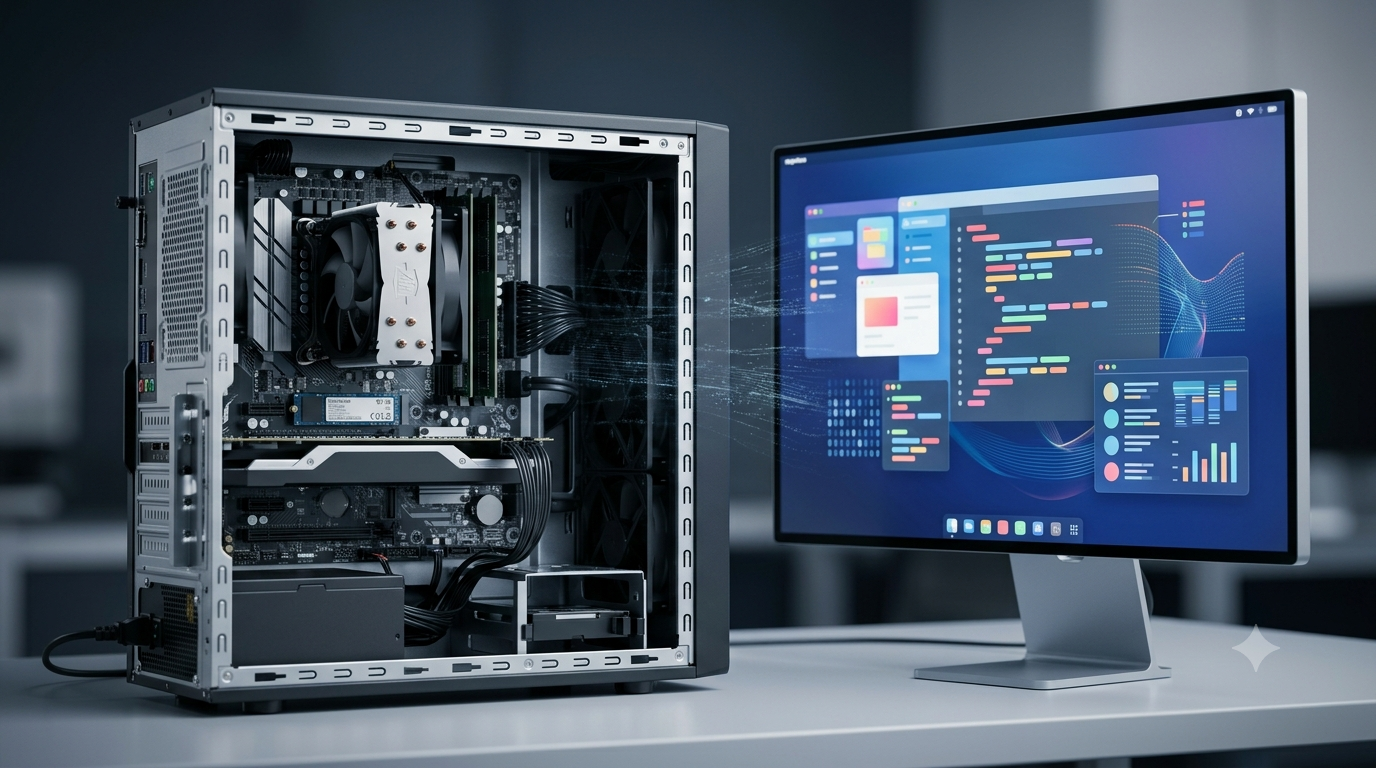
Computers have become an essential part of modern life. They are used in education, business, healthcare, communication, scientific research, entertainment, and many other fields. Whether we use a desktop computer, laptop, smartphone, or supercomputer, every computing device depends on two fundamental components: hardware and software.
Computer hardware refers to the physical parts of a computer that we can see and touch, such as the keyboard, monitor, processor, memory, and storage drive. Software refers to the programs and instructions that tell the computer what to do, such as operating systems, web browsers, games, and word processors.
Although hardware and software perform different functions, they depend on each other to make a computer work properly. Understanding the differences between them helps us learn how computers operate, identify technical problems, and choose suitable devices for different purposes.
What Is Computer Hardware?
Computer hardware refers to all the physical components that make up a computer system. These components are manufactured from materials such as metals, plastics, glass, and electronic semiconductors. Hardware performs tasks such as accepting input, processing data, storing information, and displaying results.
For example, when you type a sentence on a keyboard, the keyboard sends input to the computer. The processor handles the instructions, memory temporarily holds the data being used, and the monitor displays the sentence on the screen.
Hardware cannot perform useful computing tasks independently of the instructions and software that control it. Different hardware components work together to complete the operations requested by the user.
Main Types of Computer Hardware
Computer hardware can be divided into several categories according to its function.
1. Input Devices
Input devices allow users to enter data and instructions into a computer. They convert human actions or information from the environment into signals that a computer can process.
Common examples include:
Keyboard: Used to enter text, numbers, and commands.
Mouse: Used to control the pointer and select items on the screen.
Scanner: Converts printed documents and images into digital data.
Microphone: Captures sound and sends it to the computer.
Webcam: Captures images and video.
Touchscreen: Allows users to interact with a device by touching its display.
Input devices help establish communication between users and computer systems.
2. Processing Devices
Processing devices perform calculations, execute instructions, and manage computer operations.
The most important processing component is the Central Processing Unit (CPU). It executes program instructions and coordinates many of the computer’s activities. Its performance influences how quickly a computer can handle different workloads.
A Graphics Processing Unit (GPU) is another important component. It processes graphics and performs many calculations in parallel. GPUs are particularly useful for video games, 3D rendering, scientific computing, and artificial intelligence.
3. Memory and Storage Devices
Computers need memory and storage to hold instructions, data, and files.
Random Access Memory (RAM) temporarily stores data and instructions that the computer is actively using. It is generally volatile, meaning its contents are lost when power is removed.
Read-Only Memory (ROM) is non-volatile memory commonly used to store firmware or essential startup instructions. Its contents are retained without power, although some forms can be updated.
Storage devices preserve information for future use. Examples include:
Hard Disk Drives (HDDs)
Solid-State Drives (SSDs)
USB flash drives
Memory cards
Optical discs
Unlike ordinary RAM, these storage devices retain their stored information when the computer is switched off.
4. Output Devices
Output devices present the results of computer processing in a form that users can understand.
Examples include:
Monitor: Displays text, images, videos, and graphical interfaces.
Printer: Produces physical copies of digital documents.
Speakers: Produce sound from digital audio.
Headphones: Allow users to listen to audio privately.
Projector: Displays computer output on a larger surface.
Output devices make processed information accessible to users.
5. Communication and Networking Hardware
Communication hardware allows computers to exchange information with other devices and networks.
Examples include network interface cards, Wi-Fi adapters, Ethernet ports, routers, modems, and network switches. Some of these components are built into computers, while others operate as separate devices.
They support activities such as browsing websites, transferring files, sending emails, participating in video meetings, and accessing cloud services.
What Is Computer Software?
Computer software is a collection of programs, instructions, and related data that directs a computer to perform particular tasks. Unlike hardware, software is intangible. Users can interact with it through screens, menus, commands, and other interfaces, but they cannot physically touch a program in the same way they can touch a keyboard.
Software tells hardware how to operate and what actions to perform. For example, a word-processing application allows users to create and edit documents by sending instructions that the computer executes through its hardware.
Software is created by programmers using programming languages such as Python, Java, C++, and JavaScript. Depending on its purpose, software may control the entire computer system, help users complete everyday tasks, or provide tools for developing other programs.
Main Types of Computer Software
Computer software is commonly classified into system software, application software, and programming software. Firmware is another important category of software closely associated with hardware.
1. System Software
System software manages computer hardware and provides a platform for application programs. It helps coordinate system resources, manage files, control devices, and support the execution of other software.
Examples include:
Operating systems: Microsoft Windows, macOS, Linux, Android, and iOS.
Device drivers: Programs that enable an operating system to communicate with particular hardware devices.
System utilities: Tools used for maintenance, security, file management, and system monitoring.
An operating system manages resources such as processor time, memory, storage, and connected devices. Without suitable system software, most computers would be difficult to use for ordinary tasks.
2. Application Software
Application software is designed to help users perform specific activities. It may support personal, educational, professional, scientific, or recreational tasks.
Common examples include:
Word processors: Microsoft Word and LibreOffice Writer.
Web browsers: Google Chrome, Mozilla Firefox, and Microsoft Edge.
Spreadsheet applications: Microsoft Excel and LibreOffice Calc.
Graphic design software: Adobe Photoshop and GIMP.
Communication applications: Zoom and messaging programs.
Educational software: Learning platforms, simulations, and digital learning applications.
Entertainment software: Video games, music players, and video-editing applications.
Application software depends on the operating system and hardware resources to function. Different applications have different requirements for memory, processing power, graphics capability, and storage.
3. Programming Software
Programming software provides tools that developers use to create, test, debug, and maintain computer programs.
Examples include:
Code editors: Tools for writing and editing source code.
Compilers: Programs that translate source code into another form, such as machine code.
Interpreters: Programs that execute instructions in a programming language, often directly or through an intermediate representation.
Debuggers: Tools that help developers find and investigate errors.
Integrated Development Environments (IDEs): Applications that combine coding, testing, debugging, and other development tools.
Programming software makes it easier to create the operating systems, applications, and other programs used on computers.
4. Firmware
Firmware is specialized software stored in non-volatile memory and designed to control or support the operation of a hardware device.
For example, a router uses firmware to manage network functions, while a computer’s firmware helps initialize hardware during startup. Modern computers commonly use Unified Extensible Firmware Interface (UEFI) firmware for startup and hardware initialization.
Firmware occupies an important position between hardware and software because it provides low-level instructions that allow particular devices to operate.
Key Differences Between Computer Hardware and Software
Hardware and software are closely connected, but they differ in their nature, functions, development, and maintenance.
1. Physical Nature
The most obvious difference is that hardware is physical, whereas software is intangible.
Hardware includes components such as the processor, keyboard, monitor, and storage drive. These components can be physically handled, installed, or replaced.
Software consists of programs, instructions, and associated data. It is installed, copied, updated, or removed through digital processes rather than handled as a physical component.
2. Function
Hardware provides the physical resources required to perform computing operations. It accepts input, processes information, stores data, and produces output.
Software supplies the instructions that guide these operations. It tells the computer what tasks to perform and how to coordinate available resources.
For example, a printer is hardware, while the software used to prepare a document and the printer driver used to communicate with the printer are software.
3. Creation and Development
Hardware is designed and manufactured using electronic circuits, semiconductor technology, mechanical components, and other physical materials.
Software is developed by writing, testing, debugging, and maintaining programs. Developers use programming languages, development tools, and software engineering methods to create it.
Hardware production often requires specialized manufacturing facilities, whereas software can be developed and distributed digitally.
4. Wear and Tear
Hardware can physically deteriorate over time. Fans may wear out, batteries may lose capacity, and storage devices may fail because of age, heat, electrical problems, or physical damage.
Software does not experience physical wear in the same way. However, it can become outdated, develop bugs, encounter compatibility problems, or become vulnerable to security threats.
Software performance may also appear to decline when applications become more demanding or when unnecessary programs consume system resources.
5. Maintenance and Repair
Hardware maintenance may involve cleaning dust, improving cooling, replacing a damaged component, upgrading memory, or installing a new storage drive.
Software maintenance may involve installing updates, removing malware, correcting errors, updating drivers, or reinstalling an application.
The appropriate solution depends on the problem. Replacing a keyboard will not repair a software bug, just as reinstalling an application will not fix a physically damaged processor.
6. Dependence on Each Other
Hardware and software are interdependent. Hardware needs suitable instructions to perform useful computing tasks, while software requires compatible hardware on which to execute.
For example, a computer game needs a processor, memory, storage, and possibly a capable GPU. At the same time, the hardware requires the game software and operating system to coordinate the actions needed to run the game.
A computer may contain excellent hardware, but without suitable software, its usefulness is limited. Similarly, powerful software cannot operate properly if the available hardware lacks the necessary resources.
7. Upgrading
Hardware upgrades generally involve replacing or adding physical components. Examples include increasing RAM, installing an SSD, or upgrading a graphics card.
Software upgrades involve installing a newer version of a program, adding features, fixing bugs, or improving security.
Some upgrades are straightforward, but compatibility must always be considered. A new hardware component may require additional drivers, while a new software version may require more memory or a newer processor.
8. Cost and Distribution
Hardware usually involves manufacturing, materials, transportation, and physical distribution costs. Its price depends on factors such as performance, capacity, quality, and design.
Software distribution can often take place digitally, making it possible to deliver copies to many users without manufacturing a new physical product for every installation.
However, software is not always free. It may require a purchase, subscription, license, or payment for additional services. Hardware and software can both involve significant development and support costs.
Comparison Table of Hardware and Software
| Basis of Comparison | Computer Hardware | Computer Software |
|---|---|---|
| Meaning | Physical components of a computer | Programs and instructions used by a computer |
| Nature | Tangible | Intangible |
| Examples | CPU, RAM, keyboard, monitor | Windows, browsers, games, word processors |
| Main function | Performs physical computing operations | Directs and coordinates computing operations |
| Creation | Designed and manufactured | Programmed and developed |
| Installation | Physically connected or fitted | Installed, configured, or accessed digitally |
| Maintenance | Cleaning, repair, and replacement | Updates, debugging, and security maintenance |
| Failure | May result from physical damage or component faults | May result from bugs, corruption, or compatibility issues |
| Wear and tear | Physical deterioration can occur | No physical wear, but software can become outdated or faulty |
| Upgrading | Adding or replacing components | Installing newer versions or additional programs |
| Dependence | Requires suitable instructions to perform useful tasks | Requires compatible hardware to execute |
| Examples of problems | Damaged screen or failing SSD | Application crash or operating system error |
Examples of Hardware and Software Working Together
Hardware and software work together in almost every computer-related activity. The following examples explain their relationship in everyday situations.
Example 1: Typing a Document
When a user types a document, several components cooperate.
The keyboard captures the keystrokes. The operating system receives the input, and the word-processing application interprets it as text. The processor executes the relevant instructions, while RAM temporarily holds the data being used. The monitor displays the document, and the storage drive saves the file when the user chooses to save it.
In this example, the keyboard, CPU, RAM, monitor, and storage drive are hardware. The operating system and word processor are software.
Example 2: Browsing the Internet
When someone opens a website, the computer uses hardware such as its processor, memory, network adapter, and display.
The operating system manages system resources, while the browser requests web content and displays the resulting page. Networking software and communication protocols help transfer information between the computer and remote servers.
Without networking hardware, the computer may be unable to establish the required connection. Without appropriate software, the user cannot easily request, interpret, and display website content.
Example 3: Playing a Video Game
Video games demonstrate the relationship between hardware performance and software requirements.
The CPU processes game logic, the GPU renders graphics, RAM holds active game data, and the storage drive contains game files. The operating system and graphics drivers help the game communicate with the hardware.
If a game requires more memory or graphics capability than the computer provides, it may run slowly or fail to start. This shows why hardware specifications and software requirements must be considered together.
Example 4: Printing a Document
A printer is a hardware device, while the document application, operating system, and printer driver are software components.
When a user selects the print command, the application sends the document for printing through the operating system and an appropriate driver or printing system. The printer then uses its physical mechanisms to produce the output.
If the printer is disconnected, a hardware or connection problem may be responsible. If the printer is connected but the driver is incompatible, the problem may involve software.
Common Problems Related to Hardware and Software
Computer problems can originate in hardware, software, or the interaction between them. Recognizing the difference helps users troubleshoot more effectively.
Hardware-Related Problems
Hardware problems involve physical components or their connections.
Examples include:
A monitor that remains blank because of a damaged display or loose cable.
A computer that overheats because of blocked ventilation or a failing fan.
A storage drive that fails to read or write data.
A keyboard with damaged or unresponsive keys.
A battery that no longer holds sufficient charge.
Depending on the issue, the solution may involve checking connections, improving ventilation, testing components, or replacing damaged hardware.
Software-Related Problems
Software problems involve programs, operating systems, drivers, or digital data.
Examples include:
An application that repeatedly crashes.
An operating system that fails to start because of corrupted system files.
A program that becomes unresponsive due to a software bug.
Malware that interferes with normal operation.
An application that cannot run because it is incompatible with the operating system.
Possible solutions include updating the software, checking system settings, scanning for malware, repairing corrupted files, or reinstalling the affected program.
Problems Caused by Both
Some computer issues result from a combination of hardware and software factors.
For example, a computer may run slowly because it has insufficient RAM for the applications being used. A device may stop functioning correctly because its driver is outdated or incompatible. Overheating may cause a processor to reduce its operating speed, while demanding software increases the workload.
Therefore, troubleshooting should consider both the physical components and the programs that control them.
Why Are Hardware and Software Equally Important?
Hardware and software contribute different but equally essential capabilities to a computer system.
Hardware determines the physical resources available to perform tasks. Processor performance affects computation speed, RAM capacity influences how much active data can be handled comfortably, and storage capacity determines how much information can be retained.
Software determines how those resources are used. An operating system manages the computer, applications provide useful functions, and security programs help protect data and system operations.
A balanced computer system needs both suitable hardware and appropriate software. For example, a computer designed for basic document editing may not need an expensive graphics card. A workstation used for 3D animation, engineering simulations, or machine learning may require more powerful processing resources and specialized software.
Choosing the right combination depends on the user’s needs, budget, compatibility requirements, and expected workload.
Conclusion
Computer hardware and software are two fundamental parts of every modern computer system. Hardware includes the physical components that accept input, process data, store information, and produce output. Software consists of programs and instructions that control these components and help users perform specific tasks.
The main difference is that hardware is tangible, while software is intangible. They also differ in how they are developed, maintained, upgraded, and repaired. Despite these differences, neither can provide the full functionality of a modern computer independently of the other.
Understanding how hardware and software work together makes it easier to select suitable computers, identify technical problems, maintain devices, and appreciate the technology used in everyday life. From typing a document to running scientific simulations, almost every computer activity depends on the effective cooperation of hardware and software.
FAQs
1. What is the main difference between computer hardware and software?
Computer hardware refers to the physical components of a computer that can be seen and touched, such as the keyboard, monitor, processor, RAM, and storage drive. Software refers to the programs and instructions that tell the computer how to perform different tasks. For example, a keyboard is hardware, while a word-processing application is software. Hardware provides the physical resources needed for computing, whereas software controls how those resources are used. Both are essential for a computer to function effectively. Without suitable hardware and software working together, a computer cannot perform its intended tasks properly.
2. What are the five examples of computer hardware?
Five common examples of computer hardware are the Central Processing Unit (CPU), keyboard, monitor, Random Access Memory (RAM), and Solid-State Drive (SSD). The CPU executes instructions and performs calculations. The keyboard allows users to enter data and commands. The monitor displays information visually. RAM temporarily stores data and instructions that the computer is actively using. An SSD stores files, applications, and operating system data for long-term use. These components perform different functions but work together to support computer operations. Other hardware examples include a mouse, printer, motherboard, graphics card, speakers, and network adapter.
3. What are the five examples of computer software?
Five examples of computer software are Microsoft Windows, Google Chrome, Microsoft Word, Adobe Photoshop, and VLC Media Player. Microsoft Windows is an operating system that manages computer resources and supports applications. Google Chrome is a web browser used to access websites. Microsoft Word helps users create and edit documents. Adobe Photoshop provides tools for editing images and creating graphics. VLC Media Player plays video and audio files. These programs serve different purposes, but each depends on compatible hardware and system software to operate. Other examples include spreadsheet applications, antivirus programs, educational software, and video games.
4. Can a computer work without hardware or software?
A computer cannot perform useful computing tasks without hardware, because hardware provides the physical components needed for processing, memory, input, output, and storage. Software is also necessary for most general-purpose computer operations because it supplies the instructions that guide the hardware. A computer may contain hardware without an installed operating system, but its functionality will be limited to operations supported by its firmware or other built-in instructions. Similarly, software cannot execute without a suitable physical computing platform. Therefore, hardware and software are interdependent components of a functional computer system, although some specialized hardware can perform limited predefined operations independently.
5. What are the main types of computer hardware?
Computer hardware is commonly classified into input devices, processing devices, memory and storage devices, output devices, and communication devices. Input devices, such as keyboards and mice, allow users to enter information. Processing devices, including CPUs and GPUs, execute instructions and perform calculations. Memory and storage devices hold active data and saved information. Output devices, such as monitors and printers, present results to users. Communication hardware, including network adapters and routers, enables data exchange between devices. These categories help explain how different physical components cooperate to receive information, process it, store it, and communicate the results.
6. What are the main types of computer software?
The main types of computer software are system software, application software, and programming software. System software includes operating systems, device drivers, and utilities that manage hardware and support other programs. Application software helps users perform specific tasks, such as writing documents, browsing the internet, editing images, and analyzing data. Programming software includes code editors, compilers, interpreters, debuggers, and development environments used to create other programs. Firmware is another important category that provides low-level instructions for controlling or initializing hardware devices. Each type serves a different purpose, but all depend on suitable computing resources to operate correctly.
7. What is the difference between hardware and software maintenance?
Hardware maintenance involves inspecting, cleaning, repairing, or replacing physical computer components. Examples include removing dust from ventilation openings, replacing a damaged keyboard, upgrading RAM, and installing a new storage drive. Software maintenance involves updating programs, correcting bugs, removing malware, installing compatible drivers, and fixing configuration problems. Hardware may deteriorate because of heat, physical damage, or component failure, whereas software may encounter errors, security vulnerabilities, or compatibility issues. Both types of maintenance help keep a computer reliable and efficient. The correct approach depends on the problem, because a physical component failure usually requires a different solution from a software error.
8. Is an operating system hardware or software?
An operating system is system software, not hardware. It manages computer resources and provides an environment in which applications can run. Examples include Microsoft Windows, macOS, Linux, Android, and iOS. An operating system helps manage the processor, memory, storage, files, and connected devices. It also provides a user interface through which people interact with the computer. Although an operating system communicates closely with hardware, it consists of digital instructions and programs rather than physical components. The operating system depends on compatible hardware to execute its instructions and coordinate the computer’s activities.
9. How do hardware and software work together in a computer?
Hardware and software cooperate to complete computing tasks. For example, when a user types a document, the keyboard sends input to the computer, the operating system manages the input, and the word-processing application processes the user’s actions. The CPU executes instructions, RAM holds active data, and the monitor displays the document. When the user saves the file, the storage drive retains the information. Each component performs a different role, but the task succeeds because they work together. This relationship exists in many activities, including internet browsing, gaming, video editing, scientific calculations, and printing documents.
10. Which is more important, computer hardware or software?
Neither computer hardware nor software is universally more important because both are necessary for a useful computer system. Hardware determines the physical resources available for processing, memory, storage, communication, and output. Software determines how those resources are controlled and used to complete tasks. Powerful hardware may remain underused without appropriate software, while advanced software may run poorly on hardware that does not meet its requirements. Their relative importance depends on the intended application. For example, gaming may require a capable graphics card, while software development may benefit from sufficient memory and suitable programming tools. A balanced combination delivers the best results.