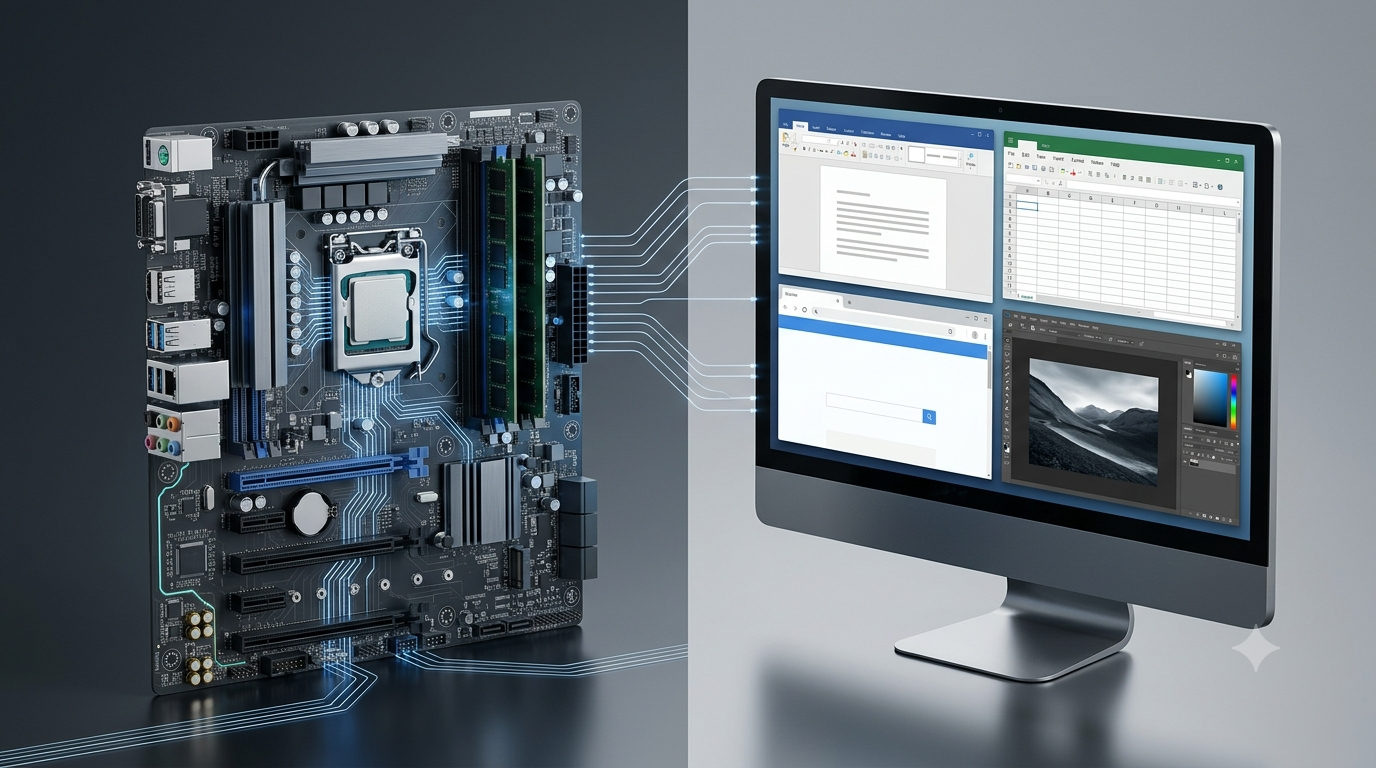
Software is an essential part of every computer system. It allows computers to perform tasks, manage hardware, process information, and help users complete their daily activities. From starting a computer to writing a document, browsing the internet, editing photographs, and playing games, software makes these operations possible. However, not all software serves the same purpose. Some programs manage the computer itself, while others help users perform specific tasks.
Software is generally divided into two major categories: system software and application software. System software provides the basic environment in which a computer operates, while application software enables users to perform particular activities. Although these two categories have different responsibilities, they work together to make a computer useful and efficient.
Understanding the difference between system software and application software helps explain how computers function, how programs interact with hardware, and why different types of software are required for everyday computing.
What Is System Software?
System software is a type of software designed to manage computer hardware and provide the basic services required for other software to run. It acts as an important link between the computer’s hardware and the applications used by people.
When a computer starts, system software helps initialize its components, manage memory, control storage devices, and prepare the operating environment. It also coordinates the use of hardware resources so that multiple programs can operate efficiently.
Most users interact with system software indirectly. For example, when someone opens a web browser, the operating system manages the memory, processor time, and other resources needed to run it. The user may not see these operations, but they are essential for the application to work correctly.
Main Functions of System Software
Hardware management: System software coordinates the operation of hardware components such as the processor, memory, keyboard, display, storage drives, and printers.
Memory management: It allocates memory to running programs and releases memory when it is no longer required. This helps multiple applications operate without unnecessarily interfering with one another.
Process management: It manages running programs and determines how processor time is shared among different tasks.
File management: It helps create, organize, access, store, and delete files and folders.
Device management: It supports communication between the operating system and connected hardware devices, often through device drivers.
Security and access control: It can manage user accounts, permissions, and other protections that help prevent unauthorized access.
Application support: It provides essential services and interfaces that applications use to perform their functions.
Examples of System Software
Common examples of system software include operating systems, device drivers, firmware, and utility programs.
Operating systems: Microsoft Windows, macOS, Linux, Android, and iOS.
Device drivers: Software that allows the operating system to communicate with hardware such as printers, graphics cards, and audio devices.
Firmware: Software stored in or associated with a hardware device that helps control its basic operation. Examples include UEFI firmware in computers and firmware in routers.
Utility programs: Tools that help maintain, protect, monitor, or optimize a computer, such as backup utilities, disk-management tools, and security software.
These components serve different purposes, but they all contribute to the operation, management, or maintenance of a computer system.
What Is Application Software?
Application software is designed to help users perform specific tasks. Unlike system software, which focuses on managing the computer and supporting its operation, application software focuses primarily on the activities users want to complete.
People use application software for communication, education, entertainment, business, creativity, and many other purposes. A word processor helps someone prepare a document, a spreadsheet program performs calculations, and a web browser provides access to websites.
Application software generally relies on services provided by the operating system. When a user saves a document, for example, the application requests the operating system to store the file on an appropriate device.
Application software may be installed on a computer, used through a web browser, or accessed through a mobile device. Some applications can also work offline, while others depend on an internet connection for their main functions.
Main Functions of Application Software
Document creation: Word-processing applications allow users to write, edit, format, and print documents.
Data processing: Spreadsheet and database applications help users organize information, perform calculations, and analyze data.
Communication: Email clients, messaging applications, and video-conferencing tools help people communicate with others.
Internet access: Web browsers allow users to visit websites, access online services, and retrieve information.
Creative work: Image editors, video editors, music-production tools, and graphic-design applications support creative activities.
Education and learning: Educational applications provide lessons, simulations, quizzes, and interactive learning resources.
Business operations: Accounting, project-management, inventory, and customer-management applications support professional and commercial activities.
Examples of Application Software
Application software includes many programs designed for different user needs.
Microsoft Word: Used to create and edit documents.
Microsoft Excel: Used to organize data, calculate values, and prepare charts.
Google Chrome: Used to access websites and web-based services.
Adobe Photoshop: Used to edit images and create digital artwork.
VLC Media Player: Used to play audio and video files.
Microsoft PowerPoint: Used to create presentations.
Zoom: Used for video meetings and online communication.
Educational applications: Used for learning subjects, practicing skills, and completing educational activities.
Each application is developed to support one or more user-oriented tasks.
System Software vs Application Software
System software and application software differ mainly in their purpose, responsibilities, and relationship with computer hardware. System software manages the computing environment, whereas application software uses that environment to perform useful tasks for users.
The following table explains their major differences.
| Basis of Comparison | System Software | Application Software |
|---|---|---|
| Main purpose | Manages hardware and provides essential system services | Helps users perform specific tasks |
| Primary focus | Operation and management of the computer | User activities and requirements |
| Relationship with hardware | Works closely with hardware components | Usually accesses hardware through system services |
| Dependency | Provides the environment and services required by applications | Generally depends on an operating system or compatible runtime environment |
| Execution | Some components run during startup and continue operating in the background | Usually runs when a user or another process starts it |
| User interaction | Often operates in the background, although some components have user interfaces | Usually designed for direct user interaction |
| Examples | Operating systems, drivers, firmware, system utilities | Word processors, browsers, games, media players |
| Installation | May come preinstalled or be installed or updated separately | May be preinstalled, downloaded, purchased, or accessed online |
| Resource management | Manages or coordinates system resources | Requests and uses resources to perform its tasks |
| Importance | Helps the computer operate and supports applications | Enables users to complete specific activities |
| Failure impact | A serious failure can affect the operation of the whole system or particular devices | A failure usually affects the application or its tasks, though some applications can affect system stability |
| Examples of tasks | Managing memory, controlling devices, scheduling processes | Editing documents, browsing websites, creating presentations |
Although these differences help classify software, some programs have overlapping responsibilities. For example, security tools may protect the operating system while also providing features that users interact with directly. Their classification depends on their main purpose and role.
Types of System Software
System software includes several categories. Each category contributes to the functioning, management, or maintenance of a computer.
1. Operating Systems
An operating system is the primary system software that manages a computer’s resources and provides an environment for applications to run.
It manages processes, memory, files, user accounts, input and output operations, and communication with supported hardware. It also provides interfaces through which users interact with the computer.
Examples include Windows, macOS, Linux, Android, and iOS.
Without a suitable operating system, most modern computers and mobile devices cannot provide their usual general-purpose computing experience. Some specialized devices, however, operate using firmware or dedicated software without a conventional general-purpose operating system.
2. Device Drivers
Device drivers allow an operating system to communicate with particular hardware components. They provide instructions and interfaces needed to control supported devices.
For example, a printer driver helps the operating system send printing instructions to a compatible printer. Graphics drivers support communication with graphics hardware, while audio drivers help manage sound devices.
A missing, outdated, or incompatible driver may cause a device to work incorrectly or remain unavailable.
3. Firmware
Firmware is software closely associated with a hardware device. It provides instructions that help the device perform its basic functions.
Computer firmware, such as UEFI, helps initialize hardware and begin the process of loading an operating system. Firmware is also used in routers, keyboards, digital cameras, smart appliances, and many other electronic devices.
Unlike ordinary applications, firmware is usually designed to support the operation of a particular device or hardware platform.
4. Utility Software
Utility software helps users maintain, monitor, secure, or manage computer systems. Examples include backup tools, disk-management utilities, file-compression programs, and security scanners.
Some utilities are included with the operating system, while others are installed separately.
The distinction between system and application software is not always absolute for utilities. A disk-management tool closely integrated with operating-system maintenance may be classified as system software, while a general-purpose file-compression application may be treated as application software. The classification depends on the program’s function and context.
Types of Application Software
Application software can be classified according to the tasks it performs and the users it serves.
1. General-Purpose Application Software
General-purpose application software is designed to support common tasks performed by many different users. It is not limited to a single organization or specialized professional activity.
Examples include word processors, spreadsheets, presentation programs, web browsers, and media players.
A student may use a word processor to prepare an assignment, while an office employee may use the same type of software to prepare a business report. The application remains useful across different situations because its functions serve a broad range of users.
2. Special-Purpose Application Software
Special-purpose application software is developed for a particular task or a relatively narrow set of related activities.
Examples include payroll-processing software, railway reservation systems, billing applications, and software designed for medical imaging.
Such applications often include features tailored to a specific workflow. A payroll system, for instance, may calculate employee salaries, deductions, allowances, and payment records according to an organization’s requirements.
3. Customized Application Software
Customized application software is developed or adapted to meet the particular needs of an individual, business, institution, or organization.
For example, a hospital may use a customized application to manage patient appointments, medical records, staff schedules, and billing. A manufacturing company may use specialized software to track production and inventory.
Customized software can fit an organization’s processes more closely than a general-purpose product, although it may require more time, money, and technical support to develop and maintain.
4. Web and Mobile Applications
Web applications are accessed through a web browser or another compatible client, often using an internet connection. Examples include online document editors, webmail services, and browser-based project-management tools.
Mobile applications are designed for smartphones and tablets. They may support messaging, banking, photography, navigation, education, and entertainment.
Both web and mobile applications are forms of application software because they help users perform specific tasks. Their delivery method does not change their fundamental purpose.
How System Software and Application Software Work Together
System software and application software are closely connected. A computer needs an environment that manages hardware and provides services before most applications can perform their intended tasks.
Consider what happens when a user writes a document using a word-processing application.
First, the operating system starts the application and allocates the resources it needs. The application displays its interface, accepts keyboard input, and allows the user to edit text.
When the user saves the document, the application requests the operating system’s file services to store the information. The operating system manages access to the storage device and coordinates the necessary operations. When the user prints the document, the application and operating system work with the relevant printing services and device driver to communicate with the printer.
These activities demonstrate that the two categories have different responsibilities but depend on one another.
Another example is watching a video. The media player application provides playback controls and processes the video content, while the operating system manages resources, communicates with audio and graphics components, and supports the necessary device operations.
This cooperation allows users to focus on their tasks without having to manage every hardware operation manually.
Can a Computer Work Without System Software?
A modern general-purpose computer usually requires system software to provide its normal computing functions. Without an operating system or another suitable software environment, users cannot typically run ordinary desktop applications in the familiar way.
However, it is important to distinguish between a computer operating in some form and a computer functioning as a general-purpose system.
A computer can execute low-level instructions, and a device may perform limited operations using firmware without a conventional operating system. For example, embedded controllers in household appliances can carry out dedicated tasks using firmware and specialized hardware.
Nevertheless, a desktop or laptop intended for everyday activities generally needs an operating system and related system components to manage hardware and support applications.
Can Application Software Work Without System Software?
Most application software depends on system software or an equivalent execution environment. Applications commonly rely on operating-system services for memory allocation, file access, input and output, networking, and other operations.
For example, a standard desktop word processor cannot normally operate as intended on a computer that lacks a compatible operating system.
There are exceptions in specialized computing environments. Some programs run directly on hardware, while others execute within firmware or a dedicated runtime environment. Even in these cases, the program still depends on some underlying mechanism to control hardware and execute instructions.
Therefore, the key point is that application software usually requires a suitable software environment, although that environment does not always have to be a conventional operating system.
Importance of System Software and Application Software
Both categories are essential to modern computing, but they contribute in different ways.
Importance of System Software
System software provides the foundation on which most computer activities depend. It manages hardware resources, supports multitasking, coordinates communication with devices, and provides security and access-control mechanisms.
It also helps maintain system stability and compatibility. Updates to operating systems and drivers can improve performance, resolve errors, and address security weaknesses.
Without appropriate system software, a computer may be unable to use its hardware effectively or run the applications required by its users.
Importance of Application Software
Application software makes computing useful for everyday life and professional work. It allows people to communicate, learn, create content, analyze information, conduct business, and solve practical problems.
For example, spreadsheet applications help businesses examine financial data, educational software supports learning, and graphic-design applications help creators produce visual content.
Different users require different applications depending on their goals. This flexibility allows computers to serve a wide range of purposes across education, healthcare, engineering, research, entertainment, and industry.
Common Misconceptions About System Software and Application Software
Several misunderstandings can make the difference between these categories confusing.
Misconception 1: System software has no user interface.
System software often operates in the background, but some components provide graphical interfaces or command-line tools. Operating-system settings and file-management utilities are examples of system-related tools with which users interact directly.
Misconception 2: Application software always requires an internet connection.
Many applications work offline. A locally installed text editor, calculator, or offline media player can perform its main functions without internet access. Online access is required only when the application’s features or services depend on it.
Misconception 3: All utility programs are application software.
Utilities can be classified differently depending on their purpose. Tools closely involved in system maintenance may be considered system software, while standalone utilities intended for general user tasks may be classified as applications.
Misconception 4: System software and application software are completely independent.
The two categories have different responsibilities, but they interact constantly. Applications rely on system services, and the operating system manages the resources applications need.
Misconception 5: An operating system and an application are the same type of program.
An operating system manages the computing environment and supports other programs. An application uses the available environment to help users complete particular tasks. Their purposes are different even though both are software.
Conclusion
System software and application software are two fundamental categories of computer software. System software manages hardware resources, supports essential operations, and provides the environment in which applications can run. Operating systems, device drivers, firmware, and certain utility programs are common examples.
Application software, on the other hand, helps users complete specific activities such as writing documents, browsing websites, analyzing data, editing images, and communicating with others. Word processors, spreadsheets, web browsers, and media players are familiar examples.
The main difference lies in their purpose: system software manages and supports the computer, while application software helps users perform tasks. Although they serve different roles, they work together to provide a functional computing experience. Understanding this relationship makes it easier to recognize different software types and appreciate how computers support everyday activities.