Digital storage is measured using units such as bytes, kilobytes, megabytes, gigabytes, and terabytes. However, these units can represent values in two different ways: decimal units and binary units. This difference is one reason why the storage capacity printed on a device may not appear exactly the same when the device is viewed on a computer.
For example, a storage drive may be advertised as having 500 GB of capacity, while an operating system may display a value that appears slightly smaller. This does not necessarily mean that storage space is missing. The difference usually comes from the way decimal and binary units are defined and calculated.
Understanding binary and decimal storage units is important for anyone learning computer science, digital technology, data storage, or information technology. It helps explain the relationship between bits, bytes, kilobytes, megabytes, gigabytes, and larger storage units, as well as why different devices and operating systems may report storage capacity differently.
What Are Digital Storage Units?
Digital storage units are measurements used to describe how much digital information a device can store. Computers store information in the form of binary data, using the two basic states represented by 0 and 1.
The smallest commonly discussed unit of digital information is the bit. A bit can have a value of either 0 or 1. Eight bits make one byte.
A byte can represent 256 different possible combinations of eight binary digits. Bytes are commonly used as a basic unit for measuring files, memory, and storage capacity.
As the amount of data increases, larger units are used:
1 byte = 8 bits
1 kilobyte is approximately 1,000 bytes in the decimal system
1 megabyte is approximately 1,000 kilobytes
1 gigabyte is approximately 1,000 megabytes
1 terabyte is approximately 1,000 gigabytes
These decimal relationships are based on powers of 10.
Binary measurement uses a different system based on powers of 2. This is where units such as kibibyte, mebibyte, gibibyte, and tebibyte become important.
Why Are There Two Systems?
The existence of two measurement systems is closely connected to the way computers work.
Computers use binary information internally. Because binary numbers are based on powers of 2, values such as 1,024 occur naturally in computing.
For many years, storage and memory measurements were commonly described using familiar decimal prefixes such as kilo, mega, and giga, even when the actual calculations involved powers of 2.
For example, a value of:
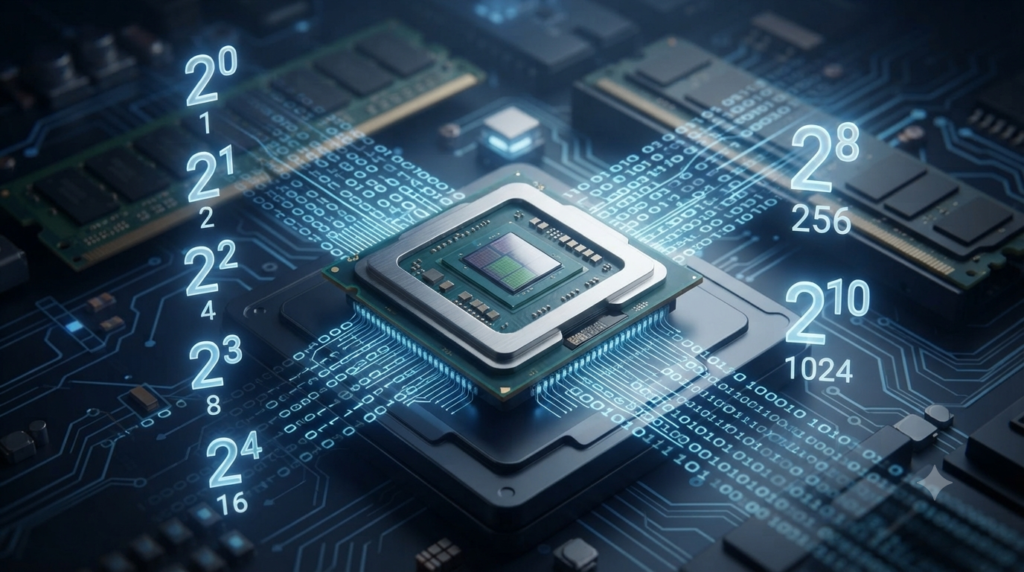
2¹⁰ = 1,024
was often called a kilobyte.
Similarly:
2²⁰ = 1,048,576 bytes
was often called a megabyte.
However, the standard decimal meaning of the prefix “kilo” is 1,000, not 1,024. To remove this ambiguity, specific binary prefixes were introduced.
Today, the two systems can be distinguished as decimal units and binary units.
Decimal Units in Digital Storage
Decimal storage units are based on powers of 10. They are commonly used by storage manufacturers when describing the capacity of hard drives, SSDs, USB drives, memory cards, and other storage devices.
The main decimal units are:
| Unit | Symbol | Value |
|---|---|---|
| Byte | B | 1 byte |
| Kilobyte | KB | 1,000 bytes |
| Megabyte | MB | 1,000,000 bytes |
| Gigabyte | GB | 1,000,000,000 bytes |
| Terabyte | TB | 1,000,000,000,000 bytes |
| Petabyte | PB | 1,000,000,000,000,000 bytes |
Each step increases by a factor of 1,000.
For example:
1 GB = 1,000 MB
and:
1 TB = 1,000 GB
This makes decimal units straightforward because they follow the same basic pattern as other metric units.
Example of Decimal Storage
Suppose an SSD is advertised as having a capacity of 500 GB.
Using the decimal system:
500 GB = 500 × 1,000,000,000 bytes
Therefore:
500 GB = 500,000,000,000 bytes
The manufacturer is therefore describing the drive using a capacity of 500 billion bytes.
Binary Units in Digital Storage
Binary units are based on powers of 2. They are specifically named using the prefixes kibi, mebi, gibi, tebi, and pebi.
The main binary units are:
| Unit | Symbol | Value |
|---|---|---|
| Kibibyte | KiB | 1,024 bytes |
| Mebibyte | MiB | 1,048,576 bytes |
| Gibibyte | GiB | 1,073,741,824 bytes |
| Tebibyte | TiB | 1,099,511,627,776 bytes |
| Pebibyte | PiB | 1,125,899,906,842,624 bytes |
The relationships are:
1 KiB = 1,024 bytes
1 MiB = 1,024 KiB
1 GiB = 1,024 MiB
1 TiB = 1,024 GiB
These units are based on powers of 2.
For example:
1 KiB = 2¹⁰ bytes
1 MiB = 2²⁰ bytes
1 GiB = 2³⁰ bytes
1 TiB = 2⁴⁰ bytes
The binary system is particularly useful when discussing the way computers organize and address data.
KB vs KiB
One of the most important distinctions to understand is the difference between KB and KiB.
Although they look similar, they do not represent exactly the same amount of data.
1 KB = 1,000 bytes
while:
1 KiB = 1,024 bytes
The difference is small at lower units but becomes more noticeable as the units become larger.
For example:
1 MB = 1,000,000 bytes
whereas:
1 MiB = 1,048,576 bytes
Similarly:
1 GB = 1,000,000,000 bytes
whereas:
1 GiB = 1,073,741,824 bytes
Therefore, KB and KiB should not be treated as interchangeable when precise measurements are required.
MB vs MiB
The same distinction applies to megabytes and mebibytes.
A decimal megabyte is:
1 MB = 1,000,000 bytes
A binary mebibyte is:
1 MiB = 1,048,576 bytes
The difference comes from the underlying calculation.
Decimal:
1 MB = 10⁶ bytes
Binary:
1 MiB = 2²⁰ bytes
This distinction is important when comparing file sizes, storage capacities, memory usage, and technical specifications.
GB vs GiB
Gigabytes and gibibytes are another common source of confusion.
A decimal gigabyte contains:
1 GB = 1,000,000,000 bytes
A binary gibibyte contains:
1 GiB = 1,073,741,824 bytes
Because a GiB contains more bytes than a GB, a storage capacity expressed in GB will produce a numerically smaller value when converted into GiB.
For example, a drive with exactly 500,000,000,000 bytes has:
500 GB
but approximately:
465.66 GiB
This is one reason a computer may appear to show less storage than the number printed on the product packaging.
Why Does a 500 GB Drive Appear Smaller?
Suppose you purchase a storage drive advertised as 500 GB.
The manufacturer generally uses decimal units:
500 GB = 500,000,000,000 bytes
If a system reports the capacity using binary units, it divides the total number of bytes by:
1,073,741,824 bytes per GiB
The result is approximately:
465.66 GiB
Therefore, the drive has not lost roughly 34 GB of physical storage. The apparent difference is mainly the result of using different measurement systems.
There may also be some space used by formatting, partition structures, file systems, recovery partitions, or system data. These are separate from the difference between decimal and binary units.
Decimal vs Binary Storage Units
The two systems can be compared directly:
| Decimal System | Binary System |
|---|---|
| Based on powers of 10 | Based on powers of 2 |
| KB = 1,000 bytes | KiB = 1,024 bytes |
| MB = 1,000,000 bytes | MiB = 1,048,576 bytes |
| GB = 1,000,000,000 bytes | GiB = 1,073,741,824 bytes |
| TB = 1,000,000,000,000 bytes | TiB = 1,099,511,627,776 bytes |
| Common in storage marketing | Common in technical computing contexts |
The important point is that decimal and binary units measure the same underlying data using different scales.
Storage Manufacturers and Decimal Units
Storage manufacturers commonly use decimal units because the SI prefixes kilo, mega, giga, and tera have well-established decimal meanings.
For example, a manufacturer may label a drive:
1 TB
This means:
1 TB = 1,000,000,000,000 bytes
It does not mean exactly 1,024 GB under the binary interpretation.
This approach is also useful for comparing storage products because the decimal system provides a consistent metric relationship between units.
Computer Memory and Binary Measurement
Computer memory has historically been closely associated with powers of 2.
Memory capacities such as:
4 GiB
8 GiB
16 GiB
32 GiB
are naturally related to binary addressing and memory organization.
However, manufacturers and operating systems do not always use the same terminology consistently. A specification may use GB while technically referring to a binary-sized quantity.
This is why it is useful to look at the actual unit symbols rather than assuming that every use of “GB” means exactly the same thing.
Why the Difference Becomes Larger
The numerical difference between decimal and binary units becomes more noticeable at larger scales.
For example, the difference between 1,000 bytes and 1,024 bytes is only 24 bytes.
But at the gigabyte level:
1 GB = 1,000,000,000 bytes
while:
1 GiB = 1,073,741,824 bytes
The difference is more than 73 million bytes.
At the terabyte level, the difference becomes even larger.
This happens because the difference between powers of 10 and powers of 2 accumulates as the unit becomes larger.
Converting Decimal Units to Binary Units
To convert a decimal storage value into binary units, the actual number of bytes should be used.
For example, consider:
1 GB = 1,000,000,000 bytes
To express this in GiB:
1,000,000,000 ÷ 1,073,741,824 ≈ 0.931 GiB
Therefore:
1 GB ≈ 0.931 GiB
Similarly:
1 TB ≈ 0.909 TiB
These conversions explain why a decimal storage capacity appears numerically smaller when expressed using binary units.
Common Examples of Storage Sizes
Digital files and devices can have very different storage requirements.
A short text file may occupy only a few kilobytes. A high-quality photograph may require several megabytes. A video can require several gigabytes, while large databases and data centers may require terabytes or petabytes.
Some common examples include:
Text documents: usually KB to MB
Images: usually MB
Music files: several MB each
High-resolution videos: GB or more
Computer applications: hundreds of MB to many GB
Games: often tens or hundreds of GB
Personal storage drives: hundreds of GB to several TB
Data centers: TB to PB and beyond
The exact size depends on the file format, compression, resolution, duration, and other factors.
Bits and Bytes
It is also important not to confuse bits with bytes.
A lowercase b usually represents a bit, while an uppercase B represents a byte.
Therefore:
8 bits = 1 byte
Storage capacity is generally expressed in bytes and their larger units, such as GB and TB.
Data transfer rates, on the other hand, are commonly expressed in bits per second, such as:
Mbps
or:
Gbps
For example, a network connection advertised at 100 Mbps is describing a data transfer rate of 100 megabits per second, not 100 megabytes per second.
Understanding the difference between bits and bytes prevents another common source of confusion when working with digital technology.
Why Understanding Both Systems Matters
Knowing the difference between decimal and binary units is useful in several situations.
When buying a storage device, it helps explain why the available capacity shown by a computer may differ from the advertised capacity.
When working with operating systems, it helps you understand how storage and memory values are displayed.
For programmers and computer science students, it provides a clearer understanding of how digital information is represented and measured.
For IT professionals, the distinction is important when calculating storage requirements, server capacity, backup space, database sizes, and data transfer requirements.
Most importantly, it helps avoid assuming that KB always means 1,024 bytes or that GB always means 1,073,741,824 bytes.
Key Difference Between Decimal and Binary Units
The easiest way to remember the difference is:
Decimal units use powers of 10.
Binary units use powers of 2.
For decimal storage:
1 KB = 1,000 bytes
1 MB = 1,000 KB
1 GB = 1,000 MB
1 TB = 1,000 GB
For binary storage:
1 KiB = 1,024 bytes
1 MiB = 1,024 KiB
1 GiB = 1,024 MiB
1 TiB = 1,024 GiB
The prefixes themselves provide a useful clue. Kilo, mega, giga, and tera are decimal prefixes, while kibi, mebi, gibi, and tebi are binary prefixes.
Conclusion
Binary and decimal units provide two different ways to measure digital storage. Decimal units are based on powers of 10, with 1 KB equal to 1,000 bytes and 1 GB equal to 1,000,000,000 bytes. Binary units are based on powers of 2, with 1 KiB equal to 1,024 bytes and 1 GiB equal to 1,073,741,824 bytes.
The difference between these systems explains why a storage device advertised as 500 GB may appear to have approximately 465.66 GiB when viewed using binary units. The storage has not necessarily disappeared; the measurement scale is different.
By understanding bits, bytes, decimal units, and binary units, you can interpret storage specifications more accurately and avoid confusion when working with computers, smartphones, SSDs, hard drives, memory, files, and other digital technologies.
FAQs
1. What are decimal units in digital storage?
Decimal units are measurements of digital storage based on powers of 10. In this system, 1 kilobyte (KB) equals 1,000 bytes, 1 megabyte (MB) equals 1,000,000 bytes, and 1 gigabyte (GB) equals 1,000,000,000 bytes. Larger units follow the same pattern, so 1 terabyte (TB) equals 1,000,000,000,000 bytes. Decimal units are commonly used by storage manufacturers when describing the capacity of hard drives, SSDs, USB drives, and memory cards. The decimal system makes storage capacities easy to compare because each unit is exactly 1,000 times the previous unit.
2. What are binary units in digital storage?
Binary units are measurements based on powers of 2 rather than powers of 10. The standard binary units include kibibytes (KiB), mebibytes (MiB), gibibytes (GiB), and tebibytes (TiB). One kibibyte equals 1,024 bytes, while one mebibyte equals 1,024 KiB. Similarly, one gibibyte equals 1,024 MiB. Binary units are useful when describing quantities that are naturally related to the binary system used by computers. Using terms such as KiB and GiB helps distinguish binary measurements from decimal measurements such as KB and GB.
3. What is the difference between KB and KiB?
KB and KiB represent different storage measurements. A kilobyte (KB) is a decimal unit and equals exactly 1,000 bytes. A kibibyte (KiB) is a binary unit and equals exactly 1,024 bytes. The difference comes from the number system used to define each unit. KB is based on a power of 10, while KiB is based on a power of 2. Although the difference between 1,000 and 1,024 bytes is relatively small, it becomes more noticeable with larger units. Therefore, KB and KiB should not be considered exactly interchangeable when precise storage calculations are required.
4. Why is 1 GB not equal to 1 GiB?
One GB and one GiB are different because they use different measurement systems. A gigabyte (GB) is a decimal unit containing exactly 1,000,000,000 bytes. A gibibyte (GiB) is a binary unit containing 1,073,741,824 bytes. Therefore, one GiB contains more bytes than one GB. In approximate terms, 1 GB is about 0.931 GiB. The difference becomes increasingly noticeable at larger storage sizes. This distinction is especially important when comparing storage specifications, operating-system displays, and technical documentation. Using the correct unit symbol helps identify whether a measurement is decimal or binary.
5. Why does a 500 GB drive show less storage on a computer?
A 500 GB drive may appear to have less than 500 GB when viewed on a computer because the manufacturer and operating system may use different measurement systems. A manufacturer generally defines 500 GB as 500,000,000,000 bytes using decimal units. When those bytes are expressed in binary units, the capacity is approximately 465.66 GiB. Additional space may also be used by formatting, file-system structures, recovery partitions, or system information. Therefore, the difference does not necessarily mean that the storage device is defective or missing data. It is largely a result of different measurement methods.
6. Are GB and GiB the same thing?
No, GB and GiB are not exactly the same. GB stands for gigabyte and is a decimal unit equal to 1,000,000,000 bytes. GiB stands for gibibyte and is a binary unit equal to 1,073,741,824 bytes. Because a GiB contains more bytes than a GB, the numerical values differ when the same amount of storage is expressed using the two systems. For example, 500 GB is approximately 465.66 GiB. The terms are sometimes used loosely in everyday computing, but technically they describe different quantities. Understanding this distinction helps when reading storage specifications and technical information.
7. Which units are commonly used by storage manufacturers?
Storage manufacturers commonly use decimal units such as KB, MB, GB, and TB to describe the capacity of their products. For example, a drive labeled 1 TB generally means that it contains 1,000,000,000,000 bytes. Decimal units follow powers of 10, making each larger unit 1,000 times the previous one. This approach follows the standard meaning of metric prefixes such as kilo, mega, giga, and tera. Products such as SSDs, hard drives, USB flash drives, and memory cards commonly use these decimal measurements. The exact way an operating system displays the capacity can differ depending on its measurement convention.
8. Why are binary units important in computer science?
Binary units are important because computers fundamentally process information using binary values represented by 0 and 1. Many computing structures naturally relate to powers of 2. For example, 1,024 bytes equals 2¹⁰ bytes, while 1,048,576 bytes equals 2²⁰ bytes. Binary units such as KiB, MiB, and GiB provide precise names for these quantities. They are particularly useful when discussing memory, addressing, computing resources, and technical calculations. Using the correct binary terminology also prevents confusion between values based on powers of 2 and decimal quantities based on powers of 10.
9. What is the difference between a bit and a byte?
A bit and a byte are different units of digital information. A bit is the smallest basic unit and can have a value of either 0 or 1. A byte consists of 8 bits. Bytes are commonly used to measure file sizes and storage capacity, while bits are frequently used to describe data transmission speeds. For example, storage may be described in gigabytes (GB), while an internet connection may be advertised in gigabits per second (Gbps). Because 8 bits make one byte, confusing bits and bytes can lead to significant errors when comparing storage capacity with network speeds.
10. Why is it important to understand binary and decimal storage units?
Understanding binary and decimal storage units helps you interpret computer and storage specifications correctly. It explains why a device advertised as 500 GB may appear as approximately 465.66 GiB when measured using binary units. It also helps distinguish KB from KiB, MB from MiB, and GB from GiB. This knowledge is useful when buying storage devices, calculating storage requirements, studying computer science, managing servers, or working with operating systems. The basic rule is simple: decimal units use powers of 10, while binary units use powers of 2. Knowing this difference prevents many common storage-related misunderstandings.