Time measurement and execution rate are important concepts in mathematics, physics, computer science, and everyday life. Time measurement tells us how long an activity takes, while an execution rate describes how much work is completed within a given period. These concepts help us measure performance, compare processes, calculate speed, and understand how efficiently a task is performed.
For example, we use time measurement to determine how long a machine operates, how much time a student spends solving a problem, or how long a computer program takes to finish running. Execution rate helps us understand how many operations a computer performs per second or how many tasks a machine completes in one minute.
By learning the basic time measurement and execution rate formulas, we can solve practical problems involving elapsed time, processing speed, completion rates, and performance calculations. These formulas are useful for beginners who want to build a strong foundation in mathematics and computer science.
1. What Is Time Measurement?
Time measurement is the process of determining the duration between two events or measuring how long an activity takes to complete. Time is a fundamental physical quantity that helps us describe the order and duration of events.
The standard SI unit of time is the second, represented by the symbol s. Other commonly used units include minutes, hours, milliseconds, and microseconds.
For example, if a computer program starts at 10:00:00 and finishes at 10:00:05, its execution time is five seconds.
Time measurement is used in many areas, including scientific experiments, sports, industrial production, transportation, and computer performance testing.
2. Basic Units of Time
Different units of time are used depending on the duration being measured. Longer activities are usually measured in hours or minutes, while very short events may be measured in milliseconds or microseconds.
The basic time conversions are:
1 minute = 60 seconds
1 hour = 60 minutes
1 hour = 3,600 seconds
1 day = 24 hours
1 second = 1,000 milliseconds
1 millisecond (ms) = 0.001 seconds
1 microsecond (µs) = 0.000001 seconds
1 nanosecond (ns) = 0.000000001 seconds
These conversions are especially useful in computer science because computer operations can take only a few milliseconds, microseconds, or nanoseconds.
Example: Convert 5 minutes into seconds.
Since 1 minute equals 60 seconds:
Time in seconds = 5 × 60 = 300 seconds.
Therefore, 5 minutes equals 300 seconds.
3. Basic Time Measurement Formulas
Time measurement formulas help us calculate elapsed time, start time, and finish time. They are useful whenever an activity has a known starting point, ending point, or duration.
3.1 Elapsed Time Formula
Elapsed time is the total duration between the start and end of an activity.
Formula:
Elapsed Time = End Time − Start Time
This formula is used when the starting and finishing times are known.
Example:
A program starts at 2:15 PM and finishes at 2:15:08 PM.
Start time = 2:15:00 PM
End time = 2:15:08 PM
Elapsed time = 8 seconds.
Therefore, the program takes 8 seconds to execute.
When working with clock times, both values should use the same time units. If an activity crosses midnight, the calculation must account for the change of day.
3.2 Execution Time Formula
Execution time is the amount of time required to complete a particular task or run a process.
Formula:
Execution Time = Finish Time − Start Time
For a computer program, execution time is often measured using a timer before and after the program runs.
Example:
A program begins execution at 12.4 seconds on a timer and finishes at 15.9 seconds.
Execution Time = 15.9 − 12.4
Execution Time = 3.5 seconds.
Therefore, the program’s measured execution time is 3.5 seconds.
In computer science, execution time can vary depending on the processor, memory, input data, background processes, and software implementation.
3.3 Start Time Formula
If the finishing time and elapsed duration are known, the starting time can be calculated by subtracting the duration from the finishing time.
Formula:
Start Time = End Time − Elapsed Time
Example:
A task finishes at 11:00 AM and takes 25 minutes.
Start Time = 11:00 AM − 25 minutes
Start Time = 10:35 AM.
Therefore, the task started at 10:35 AM.
3.4 End Time Formula
If the starting time and duration are known, the finishing time can be calculated by adding the duration to the starting time.
Formula:
End Time = Start Time + Elapsed Time
Example:
A computer process starts at 9:30 AM and runs for 40 minutes.
End Time = 9:30 AM + 40 minutes
End Time = 10:10 AM.
Therefore, the process finishes at 10:10 AM.
4. What Is Execution Rate?
Execution rate measures how much work, how many operations, or how many tasks are completed within a given period.
It describes the relationship between the amount of work performed and the time required to perform it.
General Formula:
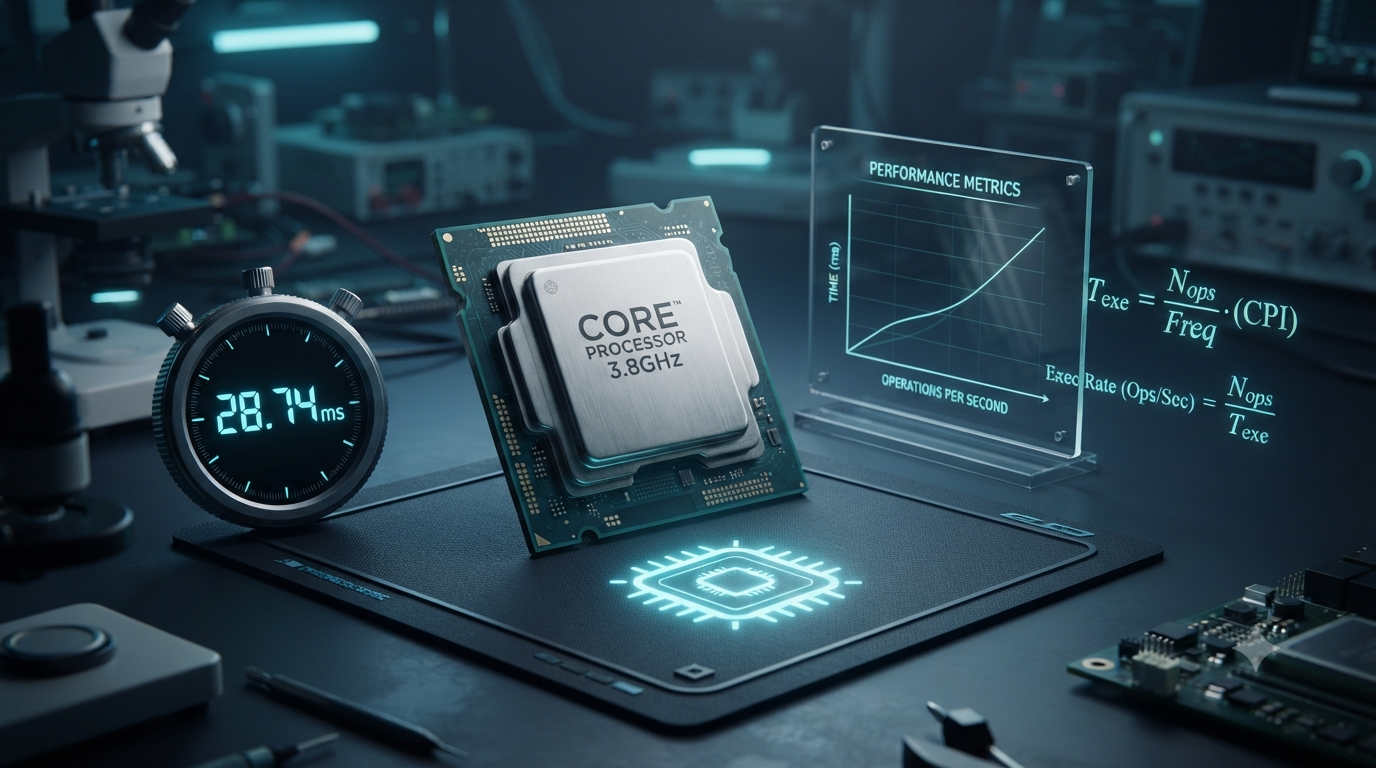
Execution Rate = Number of Operations ÷ Execution Time
The execution rate depends on the type of activity being measured. For example, a computer may execute millions of instructions per second, a printer may produce several pages per minute, and a production machine may manufacture hundreds of items per hour.
Execution rate is useful for evaluating performance, comparing systems, estimating completion times, and identifying opportunities to improve efficiency.
The unit of execution rate depends on the measurement. Common examples include operations per second, instructions per second, tasks per minute, and items per hour.
5. Basic Execution Rate Formulas
5.1 Execution Rate Formula
The execution rate formula calculates how many operations are completed per unit of time.
Formula:
Execution Rate = Total Operations ÷ Total Execution Time
Example:
A computer performs 12,000 operations in 6 seconds.
Execution Rate = 12,000 ÷ 6
Execution Rate = 2,000 operations per second.
Therefore, the computer completes an average of 2,000 operations per second during the measured period.
5.2 Total Operations Formula
If the execution rate and execution time are known, the total number of operations can be calculated.
Formula:
Total Operations = Execution Rate × Execution Time
Example:
A system performs 500 operations per second for 20 seconds.
Total Operations = 500 × 20
Total Operations = 10,000 operations.
Therefore, the system completes 10,000 operations in 20 seconds, assuming the rate remains constant.
5.3 Execution Time from Execution Rate
If the total number of operations and execution rate are known, the time required can be calculated.
Formula:
Execution Time = Total Operations ÷ Execution Rate
Example:
A machine must complete 15,000 operations at a rate of 3,000 operations per second.
Execution Time = 15,000 ÷ 3,000
Execution Time = 5 seconds.
Therefore, the machine requires 5 seconds to complete the operations if it maintains the specified rate.
5.4 Tasks per Unit Time Formula
Execution rate can also measure how many complete tasks are performed in a given period.
Formula:
Task Rate = Number of Completed Tasks ÷ Total Time
Example:
A server processes 240 requests in 60 seconds.
Task Rate = 240 ÷ 60
Task Rate = 4 requests per second.
Therefore, the server processes an average of 4 requests per second during that period.
This measurement is useful for understanding server performance, production systems, and other processes that handle repeated tasks.
6. Important Computer Science Execution Rate Formulas
In computer science, execution rate is often used to measure processor performance, instruction processing, and system throughput. Different measurements describe different aspects of a computer system, so they should not be treated as interchangeable.
6.1 Instructions Per Second (IPS)
Instructions per second measures the number of machine instructions a processor executes in one second.
Formula:
IPS = Total Instructions Executed ÷ Execution Time in Seconds
Example:
A processor executes 8,000,000 instructions in 4 seconds.
IPS = 8,000,000 ÷ 4
IPS = 2,000,000 instructions per second.
Therefore, the average instruction execution rate is 2 million instructions per second.
IPS provides a basic measure of instruction-processing activity. However, it does not always provide a fair comparison between different processors because individual instructions can perform different amounts of work.
6.2 Millions of Instructions Per Second (MIPS)
MIPS expresses an instruction execution rate in millions of instructions per second.
Formula:
MIPS = Total Instructions Executed ÷ (Execution Time in Seconds × 1,000,000)
Example:
A processor executes 30,000,000 instructions in 5 seconds.
MIPS = 30,000,000 ÷ (5 × 1,000,000)
MIPS = 6.
Therefore, the measured rate is 6 MIPS.
MIPS is easy to understand, but it should be used carefully when comparing processors with different instruction sets or workloads.
6.3 Clock Cycle Time
Clock cycle time is the duration of one clock cycle in a processor. It is related to clock frequency.
Formula:
Clock Cycle Time = 1 ÷ Clock Frequency
If clock frequency is measured in hertz (Hz), clock cycle time is measured in seconds.
Example:
A processor operates at a clock frequency of 2 GHz.
2 GHz = 2,000,000,000 Hz.
Clock Cycle Time = 1 ÷ 2,000,000,000
Clock Cycle Time = 0.0000000005 seconds.
Therefore, one clock cycle lasts 0.5 nanoseconds.
A higher clock frequency means a shorter clock cycle, but it does not automatically mean that every program will execute faster. Processor architecture, instruction efficiency, memory access, and other factors also affect performance.
6.4 Average Cycles Per Instruction (CPI)
Cycles per instruction (CPI) represents the average number of processor clock cycles required to execute one instruction for a particular workload.
Formula:
CPI = Total Clock Cycles ÷ Total Instructions Executed
Example:
A processor uses 12,000 clock cycles to execute 4,000 instructions.
CPI = 12,000 ÷ 4,000
CPI = 3.
Therefore, the processor uses an average of 3 clock cycles per instruction.
A lower CPI can indicate more efficient instruction execution for a given workload, but performance comparisons also depend on clock frequency and the actual work completed.
6.5 CPU Execution Time Formula
CPU execution time estimates how long a processor spends executing a program, based on the instruction count, average CPI, and clock frequency.
Formula:
CPU Execution Time = (Instruction Count × CPI) ÷ Clock Frequency
Here, instruction count is the total number of instructions executed, CPI is the average cycles per instruction, and clock frequency is measured in cycles per second.
Example:
A program executes 2,000,000 instructions, has an average CPI of 2, and runs on a processor with a clock frequency of 2,000,000,000 Hz.
CPU Execution Time = (2,000,000 × 2) ÷ 2,000,000,000
CPU Execution Time = 0.002 seconds.
Therefore, the estimated CPU execution time is 2 milliseconds.
This formula is a fundamental relationship in processor performance analysis. It describes CPU execution time under the stated assumptions; actual elapsed program time may also include waiting for input/output, memory delays, operating-system activity, and other overheads.
7. Throughput and Execution Rate
Throughput measures the amount of work completed by a system per unit of time. Although throughput is closely related to execution rate, the terms can describe different performance measurements.
Execution rate may focus on operations performed per second, while throughput often focuses on completed tasks, transactions, requests, or data processed per unit of time.
Formula:
Throughput = Total Completed Work Units ÷ Total Time
Example:
A web server completes 900 requests in 3 minutes.
First, convert 3 minutes into seconds:
3 × 60 = 180 seconds.
Throughput = 900 ÷ 180
Throughput = 5 requests per second.
Therefore, the server’s average throughput is 5 requests per second.
Throughput is particularly useful when evaluating web servers, databases, networks, production systems, and data-processing applications.
8. How to Calculate Execution Rate Correctly
To calculate execution rate accurately, follow a consistent process.
Identify the work performed. Determine whether you are measuring instructions, operations, requests, or completed tasks.
Count the completed work units. Record the total number of operations or tasks completed during the measurement period.
Measure the time. Record the total execution time in seconds, minutes, or another appropriate unit.
Convert units when necessary. Ensure the time unit matches the unit required for the final rate.
Apply the formula. Divide the total number of completed work units by the total time.
Write the correct unit. Express the result as operations per second, tasks per minute, or another suitable rate.
Interpret the result. Remember that the calculated rate is an average over the measured interval and may change under different conditions.
Example:
A program completes 18,000 operations in 12 seconds.
Execution Rate = 18,000 ÷ 12
Execution Rate = 1,500 operations per second.
If the same program completes 36,000 operations in 12 seconds under comparable conditions, its measured execution rate is 3,000 operations per second.
This comparison shows how execution rate can be used to evaluate performance, provided that both measurements use comparable operations and conditions.
9. Difference Between Execution Time and Execution Rate
Execution time and execution rate are related, but they describe different aspects of performance.
| Feature | Execution Time | Execution Rate |
|---|---|---|
| Meaning | Time required to complete work | Work completed per unit of time |
| Basic formula | Total elapsed duration | Operations ÷ Time |
| Common units | Seconds, milliseconds | Operations per second, tasks per minute |
| Main purpose | Measures duration | Measures processing or completion rate |
| Typical interpretation | Less time can mean faster completion | Higher rate can mean more work completed per unit of time |
For a fixed amount of comparable work, a shorter execution time generally corresponds to a higher average execution rate. However, comparisons can be misleading when the workloads differ or the systems perform different amounts of work.
10. Common Mistakes in Time and Execution Rate Calculations
Beginners often make a few common mistakes when using these formulas.
Mixing time units: Dividing operations by minutes and reporting the result as operations per second produces an incorrect answer. Convert minutes into seconds before calculating a per-second rate.
Confusing time with rate: Execution time measures duration, whereas execution rate measures work completed per unit of time. They are not the same quantity.
Ignoring the starting time: When calculating elapsed time, both the start and finish measurements must be considered.
Assuming a constant rate: Some systems speed up or slow down depending on workload, temperature, resource availability, and other conditions. A calculated rate is often an average rather than a constant value.
Treating clock frequency as total performance: A processor with a higher clock frequency is not necessarily faster for every task. Architecture, CPI, memory behavior, and software characteristics also matter.
Comparing different workloads directly: Two systems should ideally be tested using the same or equivalent work before their execution rates are compared.
Avoiding these mistakes makes calculations more accurate and performance measurements easier to interpret.
Conclusion
Basic time measurement and execution rate formulas provide a foundation for understanding how long tasks take and how efficiently work is completed. Time measurement helps calculate elapsed time, starting time, finishing time, and execution duration. Execution rate determines how many operations or tasks are completed within a specified period.
In computer science, these concepts extend to instructions per second, MIPS, clock cycle time, cycles per instruction, CPU execution time, and throughput. Each formula measures a particular aspect of system performance, so understanding the meaning of each quantity is essential before comparing results.
By learning these formulas, converting time units correctly, and practising with simple examples, beginners can develop the skills needed to solve time-related problems and understand basic computer performance measurements.
FAQs
1. What Is Time Measurement?
Time measurement is the process of determining the duration between two events or measuring how long an activity takes to complete. It is used in physics, mathematics, computer science, and everyday life. The standard SI unit of time is the second, represented by the symbol s. Other common units include minutes, hours, milliseconds, and microseconds. Time measurement helps calculate elapsed time, compare the duration of different activities, and evaluate how long a computer program or machine takes to complete a task.
2. What Is the Formula for Calculating Elapsed Time?
The formula for calculating elapsed time is: Elapsed Time = End Time − Start Time. It determines the total duration between the beginning and end of an activity. For example, if a computer program starts at 10:00:05 and finishes at 10:00:12, the elapsed time is 7 seconds. Both time values must use compatible units for an accurate calculation. If the activity crosses midnight, the calculation must account for the change of day. This formula is useful for measuring task duration, program execution, travel time, and experimental observations.
3. What Is Execution Rate?
Execution rate measures the amount of work or the number of operations completed within a specific period. Its general formula is Execution Rate = Total Operations ÷ Execution Time. For example, if a computer performs 20,000 operations in 10 seconds, its average execution rate is 2,000 operations per second. Execution rate is commonly used in computer science, industrial production, and performance testing. Depending on the activity, it may be expressed in operations per second, tasks per minute, or items per hour. A higher execution rate generally means more work is completed per unit of time.
4. How Do You Calculate Execution Time?
Execution time is the duration required to complete a task or execute a computer program. When the start and finish times are known, the formula is Execution Time = Finish Time − Start Time. If the total number of operations and execution rate are known, use Execution Time = Total Operations ÷ Execution Rate. For example, a system that performs 15,000 operations at 3,000 operations per second requires 5 seconds. These calculations help estimate task duration and evaluate system performance. Actual elapsed time may differ from CPU execution time because of waiting periods and other system activities.
5. What Is the Difference Between Execution Time and Execution Rate?
Execution time and execution rate describe different aspects of performance. Execution time measures how long a task takes, usually in seconds or milliseconds. Execution rate measures how much work is completed per unit of time, such as operations per second. For a fixed amount of comparable work, a shorter execution time generally corresponds to a higher average execution rate. For example, completing 10,000 operations in 5 seconds gives a rate of 2,000 operations per second. Completing the same work in 2 seconds gives a rate of 5,000 operations per second.
6. What Is the Formula for Instructions Per Second (IPS)?
Instructions per second (IPS) measures the number of computer instructions executed in one second. Its formula is IPS = Total Instructions Executed ÷ Execution Time in Seconds. For example, if a processor executes 12 million instructions in 4 seconds, its average instruction rate is 3 million instructions per second. IPS provides a basic way to describe instruction-processing performance. However, it does not fully represent overall computer performance because different instructions can perform different amounts of work. Processor architecture, memory access, software design, and workload characteristics can all affect actual performance.
7. What Is the Formula for CPU Execution Time?
CPU execution time can be estimated using the number of instructions, average cycles per instruction (CPI), and processor clock frequency. The formula is CPU Execution Time = (Instruction Count × CPI) ÷ Clock Frequency. For example, a program executes 1,000,000 instructions with an average CPI of 2 on a processor operating at 1,000,000,000 cycles per second. The estimated CPU execution time is 0.002 seconds, or 2 milliseconds. This formula is important for understanding processor performance. It estimates CPU execution time and does not necessarily include time spent waiting for input/output operations.
8. What Is Clock Cycle Time, and How Is It Calculated?
Clock cycle time is the duration of one clock cycle in a processor. It is inversely related to clock frequency. The formula is Clock Cycle Time = 1 ÷ Clock Frequency. If a processor operates at 2 GHz, its clock frequency is 2,000,000,000 cycles per second, giving a clock cycle time of 0.5 nanoseconds. A higher clock frequency results in a shorter clock cycle. However, a shorter cycle does not automatically mean that a processor completes every task faster. Instruction efficiency, processor architecture, memory performance, and other factors also influence execution speed.
9. What Is Throughput in Computer Science?
Throughput measures the amount of work a system completes within a specified period. It is calculated using the formula Throughput = Total Completed Work Units ÷ Total Time. For example, if a server processes 600 requests in 120 seconds, its average throughput is 5 requests per second. Throughput is widely used to evaluate web servers, databases, computer networks, and data-processing systems. Although throughput and execution rate are closely related, throughput often focuses on successfully completed tasks or transactions. A system with higher throughput can process more work within the same period under comparable conditions.
10. Why Are Time Measurement and Execution Rate Formulas Important?
Time measurement and execution rate formulas are important because they help determine task duration, calculate processing speed, estimate completion times, and compare performance. In computer science, these formulas support the analysis of CPU execution time, instruction-processing rates, clock cycles, and system throughput. In everyday applications, they help measure production rates, travel durations, and work efficiency. They are also useful in scientific experiments where accurate timing is essential. Understanding these formulas enables beginners to solve practical problems, interpret performance data, and recognize the difference between the time required to complete work and the rate at which that work is performed.