Computers process many different types of information, including numbers, letters, images, sounds, videos, and instructions. Although these forms of information appear very different to humans, computers represent them using binary digits called bits. A bit can have only one of two values: 0 or 1. By combining multiple bits, a computer can represent a wide range of information.
However, an interesting question arises: How can the same number of bits represent different types of information? For example, an 8-bit pattern can represent a number, a character, a color value, or part of an instruction. The bits themselves do not automatically identify what they mean. Their interpretation depends on the rules, encoding system, and context used by a computer program.
Understanding this concept helps explain how digital computers store, process, and communicate information efficiently.
What Are Bits in a Computer?
A bit, short for binary digit, is the smallest basic unit of digital information. It can hold one of two possible values: 0 or 1.
These two values are convenient for electronic devices because physical systems can distinguish between two states. For example, a digital circuit may use a low voltage to represent 0 and a high voltage to represent 1. The exact electrical implementation depends on the hardware.
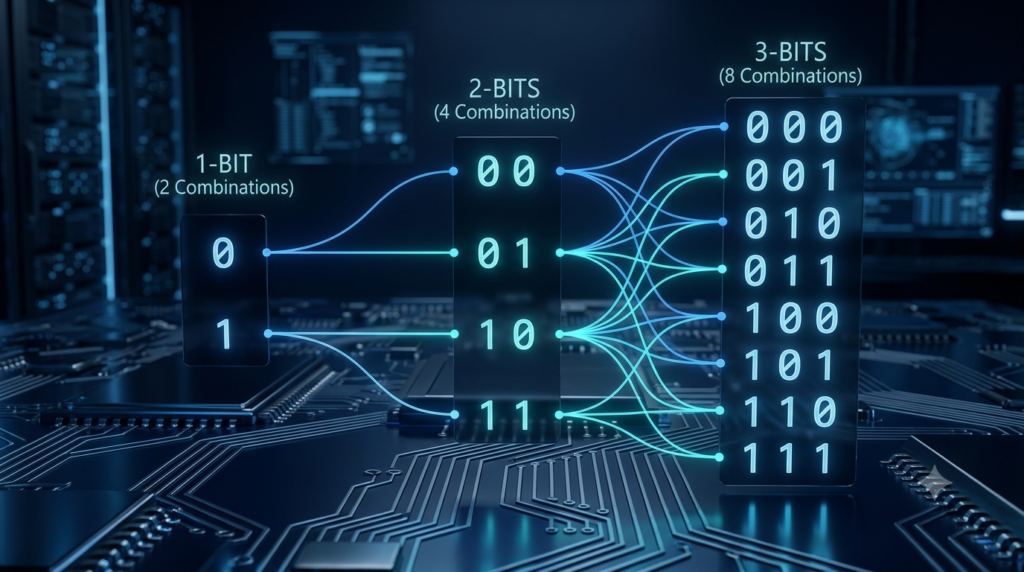
A single bit has two possible combinations:
0
1
When two bits are combined, they produce four possible combinations:
00
01
10
11
Each additional bit doubles the total number of possible combinations. Therefore, the number of combinations available with (n) bits is:
Formula:
Number of possible combinations = (2^n)
Here, (n) represents the number of bits.
For example, 8 bits can produce:
(2^8 = 256) possible combinations.
These combinations range from 00000000 to 11111111. Each pattern is a sequence of binary digits, but its meaning depends on how it is interpreted.
How Can the Same Bits Have Different Meanings?
The key idea is that bits store patterns, while encoding rules determine what those patterns represent.
Imagine receiving a message containing the pattern 01000001. Without additional information, you cannot know exactly what it means. It could represent a number, a letter, a measurement, or another kind of data.
The computer interprets this pattern according to the instructions and data format used by the software.
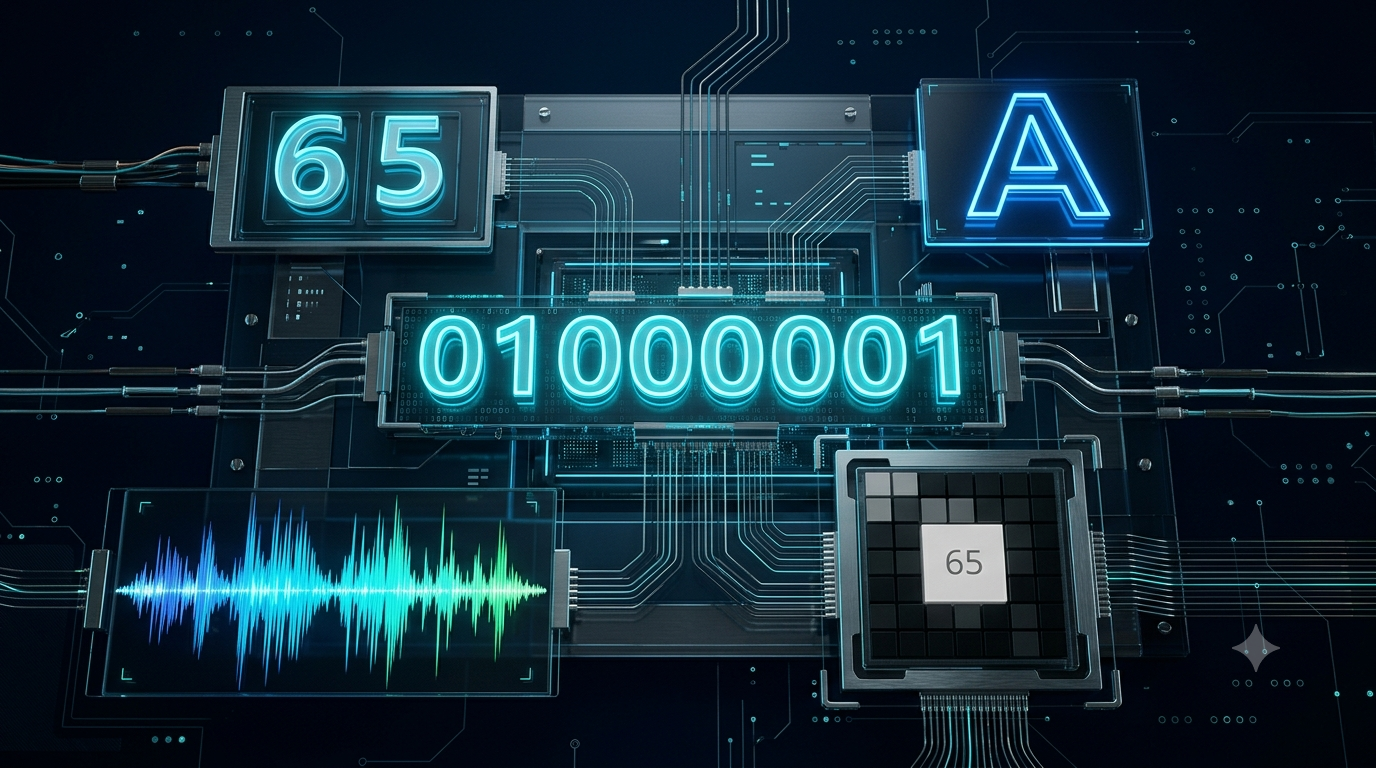
For example, the binary pattern 01000001 can represent:
The decimal number 65 when interpreted as an unsigned 8-bit integer.
The uppercase letter A when interpreted using ASCII character encoding.
A value of 65 in a grayscale system that uses 0 for black and 255 for white.
A component value in a digital image, depending on the image format and channel arrangement.
The binary pattern remains unchanged in each example. Only the interpretation changes.
This is similar to how the same written symbol can have different meanings in different situations. A symbol might represent a mathematical quantity in one context and a label in another. Likewise, a computer relies on defined rules to understand binary data.
How Many Different Values Can 8 Bits Represent?
Eight bits are commonly grouped together to form one byte. A byte can represent 256 distinct bit patterns.
For an unsigned integer, these patterns represent whole numbers from 0 to 255.
For example:
| Binary pattern | Decimal value |
|---|---|
| 00000000 | 0 |
| 00000001 | 1 |
| 00001010 | 10 |
| 01000001 | 65 |
| 11111111 | 255 |
These values show one possible interpretation of the patterns: unsigned integers.
However, the same 256 patterns can be used for other purposes. A character encoding system can assign patterns to letters and symbols. A digital image format can use them to represent pixel intensities or color components. A communication protocol can assign specific meanings to particular patterns.
The number of available patterns does not change when their purpose changes. What changes is the meaning assigned to each pattern.
Representing Numbers Using the Same Bits
Computers use different number representations depending on the type of value being stored.
Unsigned Integers
An unsigned integer represents a non-negative whole number. With 8 bits, the possible values range from 0 to 255.
For example:
00000101 = 5
00001010 = 10
In this representation, each bit contributes a value based on its position. The rightmost bit represents (2^0), the next represents (2^1), and so on.
The decimal value of a binary number is calculated by adding the powers of two corresponding to the positions containing 1.
For example:
00000101 = (4 + 1 = 5)
Signed Integers
Computers can also use bits to represent negative and positive whole numbers. A common method is called two’s complement.
In an 8-bit two’s complement representation, the pattern 11111111 represents −1 rather than 255.
This demonstrates that even when the number of bits remains the same, changing the number representation changes the meaning of the pattern.
The bit sequence itself does not contain a separate label saying whether it represents a signed or unsigned number. The system must know which representation is being used.
Floating-Point Numbers
Computers also represent numbers that contain fractional parts, such as 3.14 or 0.125. These are commonly stored using floating-point formats.
A floating-point representation divides a bit pattern into fields that encode information such as the sign, exponent, and significand. Together, these fields describe a numerical value.
The same number of bits can therefore represent a floating-point value instead of an integer, but the bit pattern must be interpreted according to the floating-point format.
Representing Text Using Binary Bits
Text is another example of how binary patterns represent information through encoding rules.
Computers do not inherently understand letters such as A, B, or C. Instead, character encoding systems assign numerical values to characters so that computers can store and process them.
ASCII Character Encoding
ASCII is a character encoding standard that assigns numerical values to letters, digits, punctuation marks, and certain control characters.
For example, the uppercase letter A has the decimal ASCII value 65. Its 8-bit representation is:
01000001
The uppercase letter B has the decimal ASCII value 66:
01000010
When a computer reads 01000001 as an ASCII-compatible character, it interprets the pattern as A. When it reads the same pattern as an unsigned integer, it interprets it as 65.
The difference is not in the bits but in the interpretation rules.
Unicode and UTF-8
Modern digital systems must represent text from many languages, including English, Marathi, Hindi, Chinese, and Arabic. They also need to represent mathematical symbols, punctuation, and emoji.
Unicode provides a standard system for assigning code points to characters. UTF-8 is one of the encoding formats used to represent Unicode text as bytes.
Unlike basic ASCII, UTF-8 uses between one and four bytes for a Unicode code point. Basic English letters and digits use one byte in UTF-8, while many other characters require multiple bytes.
For example, the letter A is represented by the byte 01000001 in UTF-8. A character from another writing system may require a different sequence of two, three, or four bytes.
This shows that computers use agreed-upon encoding rules to turn character information into binary data.
Representing Images Using Bits
Digital images are also stored as binary data. An image consists of pixels, which are small elements arranged in rows and columns.
Each pixel contains information about its appearance. The precise representation depends on the image format and color model.
Grayscale Images
A simple grayscale image may use 8 bits for each pixel. These 8 bits represent an intensity value from 0 to 255.
For example:
0 represents black.
128 represents a middle-gray intensity.
255 represents white.
The binary pattern 01000001 represents the decimal value 65. In an 8-bit grayscale image, that value can represent a relatively dark gray.
However, in a text file using ASCII-compatible encoding, the same byte represents the letter A.
The same eight bits can therefore represent either a character or an image intensity, depending on the data format.
Color Images
A common RGB image model uses three color components: red, green, and blue.
In an image with 8 bits per component, each component can represent 256 possible values. One pixel can use three bytes, or 24 bits, to represent its red, green, and blue components.
For example:
Red: 255
Green: 0
Blue: 0
This combination represents pure red in a standard RGB interpretation.
The bits that represent the red component could represent a different number or character if interpreted under another encoding system. The image format determines how the bytes are grouped and understood.
Therefore, a computer can store images using the same basic binary building blocks that it uses for text and numbers.
Representing Sound Using Bits
Digital sound is created by measuring an audio signal at regular intervals. These measurements are called samples.
Each sample records the amplitude of the signal at a particular moment. The number of bits used for each sample determines how many discrete amplitude levels can be represented.
For example, an 8-bit unsigned sample can represent 256 possible values, from 0 to 255. Other audio formats use different bit depths and numerical representations.
A sequence of samples represents how the sound signal changes over time. When played back at an appropriate sample rate, the sequence can be converted into an audio signal.
The same byte pattern used for a character or integer could also be part of an audio sample. Its meaning depends on whether the program interprets it as text, a number, or sound data.
In practice, an audio file also contains information about its format, sample rate, channel count, and other properties needed for correct playback.
Representing Instructions Using Bits
Bits do not represent only the information that computers process. They can also represent the instructions that tell a processor what to do.
Machine instructions are encoded as binary patterns defined by a processor’s instruction set architecture.
An instruction might tell a processor to add two numbers, move data between registers, compare values, or perform another operation.
However, a binary pattern does not have the same instruction meaning on every processor. Different processor architectures can assign different meanings to instruction encodings.
Furthermore, the same numerical pattern might represent ordinary data in one situation and an instruction in another. The processor’s current operation and the system’s memory organization determine how that pattern is used.
This distinction between data and instructions is fundamental to computer operation.
The Role of Context and Data Types
If the same bit pattern can represent different information, how does a computer know what it means?
The answer involves context, data types, encoding rules, and program instructions.
Data Types
A data type describes the kind of value a program is working with. Common data types include integers, floating-point numbers, characters, Boolean values, and collections of data.
For example, a program might interpret a byte as an integer:
01000001 = 65
Another program might interpret the same byte as a character:
01000001 = A
The data type guides the operations performed on the value. An integer may be added to another integer, while a character may be displayed as text.
File Formats
File formats define how data is organized and interpreted within a file.
A plain-text file, a JPEG image, and a WAV audio file may all contain bytes, but their internal structures differ.
A text format uses character encoding rules. An image format specifies how image data and related information are organized. An audio format describes how sound samples and associated metadata are stored.
When suitable software opens a file, it uses the relevant format rules to interpret the stored bytes.
If the wrong program or format is used, the information may appear as meaningless symbols, incorrect colors, or distorted sound.
Metadata and Headers
Many file formats contain metadata, which is information describing other data.
A file header may identify the file format, image dimensions, audio sample rate, or other properties. This information helps software interpret the remaining bytes correctly.
For example, an image viewer needs to understand how the image’s pixels are arranged and encoded. Without the appropriate format information, the viewer may not display the image correctly.
Metadata does not change the fundamental binary nature of the data. Instead, it helps explain how that data should be interpreted.
Can Every Bit Pattern Represent Different Types of Information?
In principle, any fixed-length bit pattern can be assigned meanings under different interpretation systems. However, this does not mean every possible meaning is valid in every format.
For example, some binary patterns may be reserved for special purposes, and some floating-point patterns represent special values such as infinity or NaN, meaning “Not a Number.”
Similarly, a character encoding may define certain byte sequences as invalid or incomplete. A processor may reserve some instruction encodings or treat them as invalid instructions.
Therefore, the interpretation depends on the rules of the particular system. A pattern can have different meanings across different systems, but each system defines which patterns are valid and what they mean.
Why Is This Principle Important in Computing?
The ability to represent different types of information using the same binary building blocks is one of the foundations of digital computing.
First, it allows computers to use a common underlying representation. Electronic circuits can work with binary states while software provides the rules needed to process many different kinds of information.
Second, it makes digital storage flexible. A memory device can store text, images, audio, numbers, and program instructions without requiring a completely different physical storage mechanism for every data type.
Third, it enables communication between devices. When computers exchange information, they can transmit sequences of bits and use agreed-upon protocols and formats to interpret those sequences correctly.
Finally, this principle supports programming languages, databases, multimedia applications, and network communication. All of these systems depend on interpreting stored or transmitted bits according to defined rules.
However, the systems communicating with one another must agree on the relevant formats and conventions. Otherwise, the same bit pattern may be interpreted differently, leading to errors.
Conclusion
The same number of bits can represent different types of information because bits store binary patterns rather than fixed meanings. A sequence such as 01000001 can represent the integer 65, the character A, or an image intensity of 65, depending on the interpretation system.
Computers determine meaning through data types, character encodings, file formats, processor instructions, and program context. The number of available bit patterns remains the same, but the rules used to interpret those patterns determine what information they represent.
This principle allows digital computers to handle many forms of information using a common binary foundation. By combining simple 0s and 1s with carefully defined rules, computers can store, process, and communicate everything from mathematical calculations to text, images, sound, and complex software instructions.
FAQs
1. How can the same number of bits represent different types of information?
The same number of bits can represent different types of information because bits store binary patterns, not fixed meanings. A computer interprets these patterns according to specific rules, such as data types, encoding systems, and file formats. For example, the 8-bit pattern 01000001 represents the number 65 when interpreted as an unsigned integer. Under ASCII character encoding, it represents the uppercase letter A. In an 8-bit grayscale image, it can represent a pixel intensity of 65. The binary pattern remains unchanged, but its meaning depends on how the computer interprets it.
2. Can the same binary pattern represent a number and a letter?
Yes, the same binary pattern can represent both a number and a letter. Computers use encoding systems to assign numerical values to characters. For example, the binary pattern 01000001 represents the decimal number 65 when interpreted as an unsigned integer. However, in ASCII-compatible character encoding, the same pattern represents the uppercase letter A. The computer does not automatically know which interpretation is intended. The program, data type, or file format provides the necessary context. This flexibility allows computers to use binary data for different purposes without changing the underlying pattern.
3. How many different values can 8 bits represent?
Eight bits can represent 256 different binary combinations. This is calculated using the formula (2^n), where (n) represents the number of bits. For eight bits, (2^8 = 256). When interpreted as an unsigned integer, these combinations represent whole numbers from 0 to 255. However, the same 256 patterns can also represent characters, image intensities, or other types of information. The number of available combinations remains unchanged, regardless of their purpose. The interpretation rules determine the meaning assigned to each pattern in a particular computer system.
4. What is the role of data types in interpreting binary information?
Data types help programs determine how stored binary information should be interpreted and processed. Common data types include integers, floating-point numbers, characters, and Boolean values. For example, a program may interpret a byte as the integer 65, while another program may interpret the same byte as the character A. Data types also influence which operations are appropriate for a value. A program can perform arithmetic on an integer or display a character as text. Although the underlying bits may be identical, the data type helps the software understand their intended meaning and use them correctly.
5. How do computers represent text using binary bits?
Computers represent text by converting characters into numerical codes and storing those codes as binary patterns. Character encoding systems define how letters, numbers, punctuation marks, and other symbols correspond to numerical values. ASCII is a well-known encoding system in which the uppercase letter A has the decimal value 65, represented by the 8-bit pattern 01000001. Modern systems commonly use Unicode-based encodings, such as UTF-8, to support many languages and symbols. When software reads text, it interprets the stored bytes according to the relevant encoding rules, allowing binary patterns to be displayed as readable characters.
6. How can the same bits represent different colors or image information?
Digital images represent visual information using pixels, with each pixel storing data about color or brightness. In an 8-bit grayscale image, a byte can represent an intensity from 0 to 255. For example, the binary pattern 01000001 represents an intensity value of 65. The same pattern can represent the character A in ASCII-compatible encoding. Color images may use multiple bytes for each pixel, depending on the color model and image format. The software interprets the stored bits according to the image’s encoding rules, determining how the values should appear on a screen.
7. Why do computers use binary to represent different types of information?
Computers use binary because electronic circuits can reliably distinguish between two states, commonly represented as 0 and 1. These states provide a practical foundation for storing and processing digital information. By combining bits, computers can represent numbers, characters, images, sound, and instructions. A single binary system also simplifies the design of digital hardware. Instead of requiring a different physical system for each type of information, computers use the same basic binary building blocks with different encoding and interpretation rules. This approach makes digital storage, processing, and communication flexible, efficient, and suitable for many different applications.
8. What happens if a computer interprets binary data using the wrong format?
If a computer interprets binary data using the wrong format, the information may appear incorrect or meaningless. For example, image data opened as plain text may produce strange characters instead of a picture. Similarly, interpreting character data as numerical values may produce numbers rather than readable letters. The binary patterns themselves may remain unchanged, but the software applies inappropriate interpretation rules. Some formats may also produce errors when the data does not satisfy their requirements. Correct interpretation therefore depends on identifying the data format, using suitable software, and applying the encoding rules expected by the system.
9. Can the same number of bits represent positive and negative numbers?
Yes, the same number of bits can represent positive and negative numbers when an appropriate signed-number representation is used. One common method is two’s complement. In an 8-bit unsigned representation, the pattern 11111111 represents 255. In an 8-bit two’s complement representation, the same pattern represents −1. The available bit patterns have not changed, but the numerical interpretation is different. An 8-bit unsigned integer can represent values from 0 to 255, while an 8-bit two’s complement integer represents values from −128 to 127. The computer must know which representation is being used.
10. Why is understanding binary interpretation important in computer science?
Understanding binary interpretation is important because almost every digital application depends on representing information through bits. Programming languages, databases, image editors, audio players, and communication systems all use binary data in different ways. Knowing how interpretation works helps explain why the same bytes can represent different values, characters, or media information. It also helps developers identify problems caused by incorrect data types, incompatible encodings, or misunderstood file formats. This knowledge is useful when learning computer architecture, data representation, networking, and programming. Ultimately, it explains how computers use a common binary foundation to handle many different kinds of information.