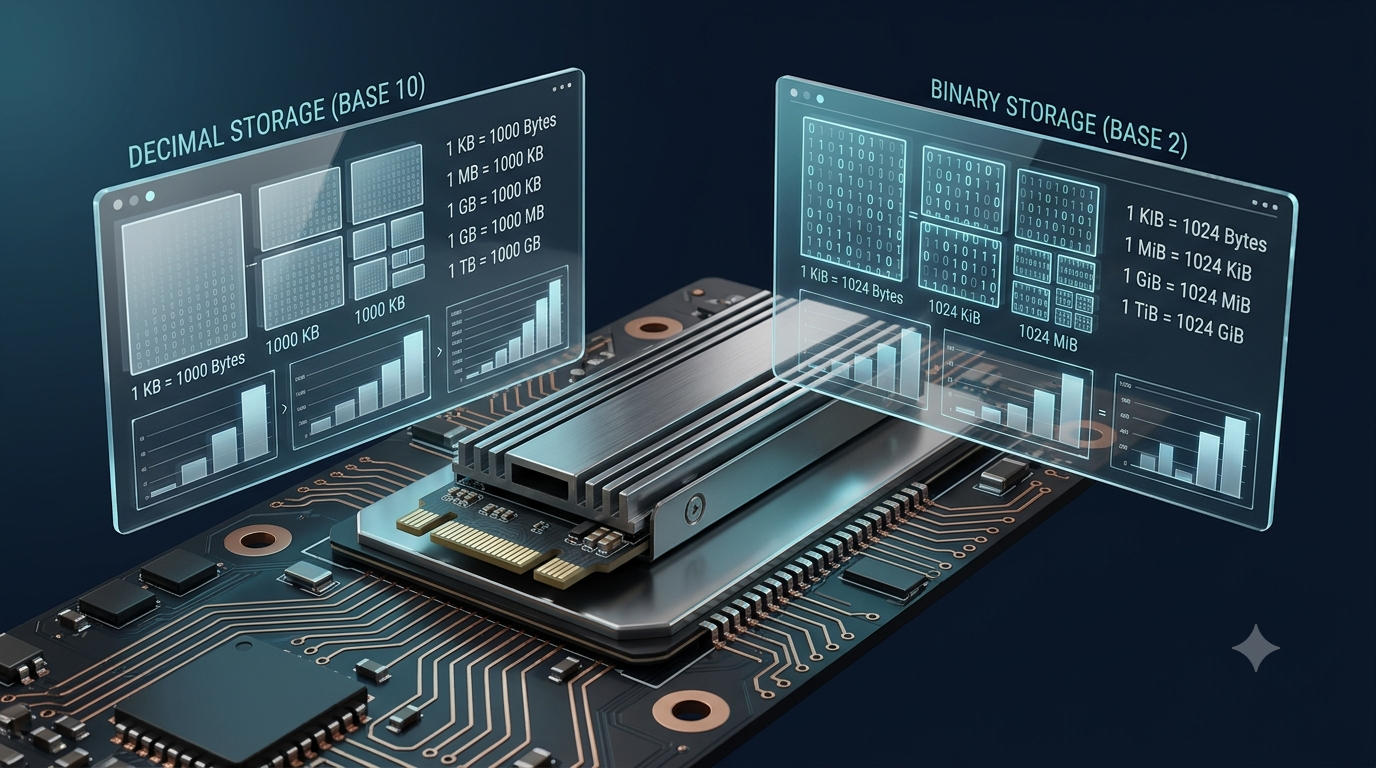
Have you ever purchased a 500 GB hard drive and noticed that your computer reports a slightly different storage capacity? Or have you wondered why a file size appears different in two applications even though the file itself has not changed? These differences often occur because digital storage can be measured using two different systems: decimal units and binary units.
Decimal units are based on powers of 10, while binary units are based on powers of 2. Both systems are used to describe digital storage, memory, and data sizes, but they calculate quantities differently. This can make the same amount of digital information appear to have different numerical values depending on the units being used.
Understanding the difference between these systems helps explain storage capacity, file sizes, computer memory, and data measurement. It also makes it easier to compare storage devices, interpret technical specifications, and avoid confusion when working with computers.
1. What Are Decimal and Binary Storage Units?
Digital information is stored and processed using bits and bytes. A bit is the smallest basic unit of digital information and can represent either 0 or 1. A byte commonly consists of eight bits.
As the amount of stored information increases, larger units are needed to describe it conveniently. Instead of expressing a storage device’s capacity using billions of bytes, manufacturers and software use units such as kilobytes, megabytes, gigabytes, and terabytes.
The difference is that these units can be calculated using either the decimal system or the binary system.
Decimal Units
Decimal units follow the base-10 number system, which is commonly used in everyday counting and mathematics. Each larger unit is 1,000 times the preceding unit.
The standard decimal storage units are:
1 kilobyte (KB) = 1,000 bytes
1 megabyte (MB) = 1,000 kilobytes
1 gigabyte (GB) = 1,000 megabytes
1 terabyte (TB) = 1,000 gigabytes
1 petabyte (PB) = 1,000 terabytes
Decimal units are widely used by storage manufacturers to advertise the capacities of hard drives, solid-state drives, USB drives, and memory cards.
For example, a drive advertised as 500 GB has a decimal capacity of 500,000,000,000 bytes.
Binary Units
Binary units follow the base-2 number system, which is fundamental to how digital computers represent and process information. Each larger binary unit is 1,024 times the preceding unit because 1,024 is (2^{10}).
The standard binary storage units are:
1 kibibyte (KiB) = 1,024 bytes
1 mebibyte (MiB) = 1,024 kibibytes
1 gibibyte (GiB) = 1,024 mebibytes
1 tebibyte (TiB) = 1,024 gibibytes
1 pebibyte (PiB) = 1,024 tebibytes
Binary units are particularly useful when describing memory sizes and other quantities calculated using powers of two. They are also used by some operating systems and technical applications to report storage information.
The important distinction is that KB and KiB are not exactly the same unit. A kilobyte contains 1,000 bytes, while a kibibyte contains 1,024 bytes.
2. Why Do Decimal and Binary Calculations Produce Different Results?
The primary reason for the difference is that decimal and binary units use different conversion factors.
In the decimal system, each step increases by a factor of 1,000. In the binary system, each step increases by a factor of 1,024.
Although these numbers are relatively close, the difference becomes noticeable when measurements involve large quantities of data.
For example:
1 KB = 1,000 bytes
1 KiB = 1,024 bytes
1 MB = 1,000,000 bytes
1 MiB = 1,048,576 bytes
1 GB = 1,000,000,000 bytes
1 GiB = 1,073,741,824 bytes
Consider one million bytes. Using decimal units, this quantity equals exactly 1 MB.
Using binary units, however, one million bytes is approximately 0.954 MiB.
The amount of data has not changed. Only the measurement system has changed.
This is similar to measuring the same distance in miles and kilometres. The physical distance remains constant, but the numerical value changes because the units use different conversion factors.
3. Understanding the Mathematics Behind the Difference
The mathematical foundation of these systems is straightforward.
Decimal units use powers of 10, whereas binary units use powers of 2.
Decimal Calculation
The number of bytes represented by a decimal unit can be calculated using powers of 1,000.
For example:
1 MB = (1,000^2) bytes
1 MB = 1,000,000 bytes
Similarly:
1 GB = (1,000^3) bytes
1 GB = 1,000,000,000 bytes
Therefore, a decimal storage measurement can be converted into bytes by multiplying it by the appropriate power of 1,000.
Binary Calculation
Binary units use powers of 1,024.
For example:
1 MiB = (1,024^2) bytes
1 MiB = 1,048,576 bytes
Similarly:
1 GiB = (1,024^3) bytes
1 GiB = 1,073,741,824 bytes
These calculations explain why a binary unit represents more bytes than the decimal unit with the corresponding prefix.
For example, 1 GiB contains 1,073,741,824 bytes, while 1 GB contains 1,000,000,000 bytes.
Consequently, one gibibyte is larger than one gigabyte.
4. How to Convert Decimal Storage Units into Binary Units
Converting storage measurements between decimal and binary units requires knowing the exact number of bytes represented by each unit.
A useful general formula is:
Binary quantity in GiB = Number of bytes ÷ 1,073,741,824
For decimal gigabytes, the number of bytes is calculated as:
Number of bytes = Decimal GB × 1,000,000,000
Combining these relationships gives the following conversion:
GiB = GB × 1,000,000,000 ÷ 1,073,741,824
For example, suppose a storage device has a decimal capacity of 500 GB.
First, calculate the number of bytes:
500 × 1,000,000,000 = 500,000,000,000 bytes
Next, convert the number of bytes into gibibytes:
500,000,000,000 ÷ 1,073,741,824 ≈ 465.66 GiB
Therefore, 500 GB is approximately 465.66 GiB.
This result explains why a 500 GB storage device may appear to have a capacity of about 465.66 GiB when its capacity is expressed in binary units.
The difference does not automatically indicate that the manufacturer has supplied less storage than advertised.
5. Why Does a 500 GB Drive Sometimes Appear to Have Only 465 GB?
This is one of the most common examples of confusion between decimal and binary storage measurements.
Storage manufacturers generally advertise capacity using decimal units. A drive labelled 500 GB contains approximately 500 billion bytes before accounting for any space used by formatting, partitions, system structures, or other overhead.
However, some software historically displayed storage quantities using binary conversion factors while labelling the units as KB, MB, or GB.
When the operating system divides the total number of bytes by 1,024 repeatedly instead of 1,000, the displayed numerical capacity becomes smaller.
For a 500 GB drive:
Advertised decimal capacity: 500,000,000,000 bytes
Capacity expressed in binary units: approximately 465.66 GiB
Some interfaces may label the latter value as approximately 465.66 GB even though the calculation actually uses gibibytes.
This inconsistent labelling is an important source of confusion. Strictly speaking, 465.66 GiB is not the same quantity as 465.66 GB.
Furthermore, the capacity visible to a user can be lower because of formatting, partitions, recovery data, file-system metadata, or software that reserves some space. These factors are separate from the decimal-versus-binary conversion.
6. Why Are Decimal Units Commonly Used for Storage Devices?
Storage manufacturers commonly use decimal units because they provide a consistent, straightforward way to describe product capacity.
The decimal system is familiar to most consumers and is convenient for communicating large numbers.
For example, advertising a drive as 1 TB is easier to understand than advertising it using the exact number of bytes or a binary capacity.
Decimal units also make product specifications easier to compare. A 1 TB drive contains twice as many bytes as a 500 GB drive when both capacities are stated using decimal units.
Manufacturers of hard drives, solid-state drives, flash drives, and memory cards commonly follow this approach.
For consumers, the most important point is that a storage device’s advertised capacity and the capacity displayed by software may be expressed using different units. Checking the actual number of bytes or identifying the conversion system can clarify the difference.
7. Why Are Binary Units Important in Computer Memory?
Computers use binary representations extensively because electronic circuits can reliably represent two basic states, commonly interpreted as 0 and 1.
Memory addresses, bit patterns, and many data structures are closely related to powers of two. As a result, binary calculations are useful when describing memory capacities and the sizes of structures that depend on binary addressing.
For example, a memory region containing (2^{20}) bytes contains 1,048,576 bytes. This quantity equals 1 MiB, not 1 MB.
Similarly, a memory region containing (2^{30}) bytes equals 1 GiB.
Binary units provide a clear way to express these quantities without rounding them into decimal values.
However, it is important to understand that computers do not have to use binary units for every storage measurement. Software can display the same number of bytes using either decimal or binary units, depending on its design and conventions.
The underlying data remains unchanged.
8. Decimal and Binary Units in File Sizes and Downloads
The difference between decimal and binary units can also affect how file sizes and download quantities are displayed.
Imagine downloading a file containing 100,000,000 bytes.
Using decimal units:
100,000,000 ÷ 1,000,000 = 100 MB
Using binary units:
100,000,000 ÷ 1,048,576 ≈ 95.37 MiB
Both measurements describe the same file.
One application might report the file as 100 MB, while another might show approximately 95.37 MiB. If the second application uses a legacy label such as MB for binary quantities, the difference can appear even more confusing.
Download speeds introduce another distinction. Network speeds are often measured in bits per second, such as Mbps, while file sizes are usually measured in bytes. Because one byte normally equals eight bits, a speed of 100 megabits per second is not equivalent to 100 megabytes per second.
For example, 100 Mbps corresponds to a theoretical maximum of 12.5 MB/s before accounting for network overhead and other limitations.
Therefore, when comparing file sizes, download speeds, or storage capacity, it is important to check both the unit and the conversion factor being used.
9. How Can You Avoid Confusion When Reading Storage Measurements?
Understanding a few basic rules makes storage calculations much easier.
Check the Unit Prefix
Look carefully at whether the measurement uses KB, MB, GB, or TB, or the binary units KiB, MiB, GiB, and TiB.
The binary prefixes provide an unambiguous indication that the measurement is based on powers of two.
Check the Conversion Factor
Determine whether the calculation uses 1,000 or 1,024 as its conversion factor.
If the conversion factor is 1,000, the calculation uses decimal units. If it is 1,024, it uses binary units.
Compare Measurements in Bytes
Bytes provide a useful common basis for comparing storage capacities. If two devices or applications report different values, converting both measurements into bytes can reveal whether they describe the same quantity.
Distinguish Capacity from Available Space
A storage device’s total capacity is not necessarily equal to the amount of space available for saving files.
Formatting, partitions, file-system structures, recovery partitions, and existing files can reduce the space available to users. These factors should not be confused with unit conversion.
Remember That Labels Can Be Inconsistent
Some software uses traditional labels such as MB and GB even when it calculates values using binary conversion factors.
If a reported value seems unexpectedly low, check the application’s documentation or determine how it converts bytes into larger units.
10. Decimal vs Binary Units: Key Differences
The following comparison summarizes the main distinctions between the two systems.
| Feature | Decimal Units | Binary Units |
|---|---|---|
| Number system | Base 10 | Base 2 |
| Conversion factor between adjacent units | 1,000 | 1,024 |
| Kilobyte equivalent | 1,000 bytes | Not the standard binary prefix |
| Binary kilobyte equivalent | Not applicable | 1 KiB = 1,024 bytes |
| Megabyte equivalent | 1 MB = 1,000,000 bytes | 1 MiB = 1,048,576 bytes |
| Gigabyte equivalent | 1 GB = 1,000,000,000 bytes | 1 GiB = 1,073,741,824 bytes |
| Common application | Storage-device specifications | Memory calculations and binary data measurements |
The table highlights that the difference is not caused by a change in the stored information. It arises from the mathematical definitions of the units used to describe that information.
Conclusion
Storage measurements are sometimes calculated differently because decimal and binary units use different conversion factors. Decimal units increase by powers of 1,000, while binary units increase by powers of 1,024. As a result, the same quantity of data can have different numerical values depending on the measurement system.
For example, a storage device advertised as 500 GB contains 500 billion bytes, which is approximately 465.66 GiB. This difference is a normal consequence of unit conversion and does not, by itself, indicate missing storage capacity.
By understanding the distinction between KB and KiB, MB and MiB, or GB and GiB, you can interpret storage specifications more accurately, compare file sizes correctly, and understand why different applications sometimes display different measurements for the same data.
Ultimately, the key is to identify the unit being used, check its conversion factor, and remember that the number of bytes—not the displayed label alone—provides the clearest basis for comparing digital storage quantities.
FAQs
1. Why are decimal and binary storage units calculated differently?
Decimal and binary storage units are calculated differently because they use different number systems. Decimal units follow the base-10 system, where each larger unit equals 1,000 of the smaller units. Binary units follow the base-2 system, where each larger unit equals 1,024 of the smaller units. For example, 1 MB equals 1,000,000 bytes, while 1 MiB equals 1,048,576 bytes. These different conversion factors produce different numerical results even when measuring the same amount of digital information. Understanding this distinction helps users interpret storage capacities, file sizes, and computer memory measurements correctly.
2. What is the difference between KB and KiB?
KB stands for kilobyte, while KiB stands for kibibyte. A kilobyte is a decimal unit containing 1,000 bytes, whereas a kibibyte is a binary unit containing 1,024 bytes. The difference may seem small for individual units, but it becomes more noticeable when measuring large quantities of data. For example, 1,000 KB equals 1,000,000 bytes, while 1,000 KiB equals 1,024,000 bytes. These distinctions help prevent confusion when comparing storage specifications, downloaded files, and computer memory. Using the correct unit symbol makes technical measurements clearer and more accurate.
3. Why does a 500 GB hard drive show approximately 465 GB?
A 500 GB hard drive contains approximately 500,000,000,000 bytes when its advertised capacity is expressed in decimal units. When software divides this quantity by 1,024 repeatedly, the result is approximately 465.66 GiB. Some operating systems or applications may display this binary-based result using the label GB instead of GiB, creating confusion. The drive has not necessarily lost storage capacity; the difference comes from the conversion method. Formatting, partitions, and system files can reduce usable space further. Checking the measurement units helps explain why the displayed capacity differs from the advertised capacity.
4. Is a gigabyte larger than a gibibyte?
No. A gigabyte (GB) is smaller than a gibibyte (GiB). One gigabyte contains 1,000,000,000 bytes, while one gibibyte contains 1,073,741,824 bytes. Therefore, 1 GiB is approximately 1.074 GB. The difference occurs because gigabytes use decimal calculations based on powers of 1,000, while gibibytes use binary calculations based on powers of 1,024. Although both units describe digital information, they are not interchangeable. Recognizing their exact definitions is useful when comparing storage devices, checking memory capacity, and calculating file sizes in computer applications.
5. Why do storage manufacturers use decimal units?
Storage manufacturers generally use decimal units because they provide a simple and consistent way to advertise product capacities. In this system, each larger unit represents 1,000 times the preceding unit. For example, a 1 TB storage device is advertised as containing 1,000 GB, or 1,000,000,000,000 bytes. This approach makes product specifications easier to communicate and compare. However, some computer software reports storage using binary conversion factors, which can produce smaller numerical values. Understanding the manufacturer’s measurement system helps consumers compare storage products fairly and avoid assuming that a capacity difference automatically indicates missing data.
6. Why are binary units useful in computer memory calculations?
Binary units are useful in computer memory calculations because digital computers represent information using binary digits, or bits, and many memory structures are organized around powers of two. For example, 1 MiB equals 1,048,576 bytes, which is (2^{20}) bytes. Similarly, 1 GiB equals (2^{30}) bytes. These relationships make binary units convenient for describing memory regions and quantities associated with binary addressing. However, computers can also display memory and storage quantities using decimal units. The appropriate system depends on the application, specification, or measurement convention being used.
7. How can you convert gigabytes into gibibytes?
To convert decimal gigabytes into gibibytes, multiply the number of gigabytes by 1,000,000,000 and divide the result by 1,073,741,824. The formula is: GiB = GB × 1,000,000,000 ÷ 1,073,741,824. For example, 500 GB equals approximately 465.66 GiB. This calculation works because one gigabyte contains 1 billion bytes, whereas one gibibyte contains 1,073,741,824 bytes. The conversion is useful when comparing advertised storage capacity with measurements reported by software that uses binary units. Always identify the units before performing the calculation to avoid inaccurate comparisons.
8. Why do two applications display different file sizes for the same file?
Two applications may display different file sizes because they use different measurement systems or rounding methods. One application might calculate megabytes using 1,000,000 bytes, while another calculates mebibytes using 1,048,576 bytes. Consequently, a file containing 10,000,000 bytes equals 10 MB but approximately 9.54 MiB. Some applications also use traditional labels such as MB while calculating with binary conversion factors. The file itself has not changed simply because its displayed size differs. Comparing the exact byte counts or checking each application’s unit definitions helps explain the difference accurately.
9. Are decimal and binary units used for internet data and download speeds?
Yes, decimal and binary units can both appear in internet data measurements, although their usage depends on the service or application. Network speeds are commonly expressed using decimal units such as Mbps, meaning megabits per second. Downloaded file sizes, meanwhile, may be displayed in MB or MiB. It is also important to distinguish bits from bytes because one byte normally contains eight bits. For example, 80 Mbps corresponds to a theoretical maximum of 10 MB/s before network overhead and other limitations. Understanding both unit systems helps users estimate download times and interpret internet speed results more accurately.
10. How can I avoid confusion when comparing storage capacities?
You can avoid confusion by checking the unit symbols, conversion factors, and measurement conventions used in storage specifications. Remember that 1 KB equals 1,000 bytes, while 1 KiB equals 1,024 bytes. Similarly, 1 GB equals 1,000,000,000 bytes, whereas 1 GiB equals 1,073,741,824 bytes. When comparing two devices or applications, convert their measurements into bytes whenever possible. Also, distinguish total device capacity from usable space, which may be reduced by formatting, partitions, or existing files. These simple checks make storage comparisons more reliable and help explain differences in reported capacity.