Every digital file occupies a certain amount of storage space on a computer, smartphone, or other digital device. Whether it is a text document, photograph, video, audio recording, or software application, its size can be estimated by counting the number of bytes used to store its data. Understanding this relationship is useful when managing storage, transferring files over a network, estimating download times, and designing computer systems.
A byte is a basic unit of digital storage, commonly consisting of eight bits. By counting the stored bytes and converting them into larger units such as kilobytes, megabytes, and gigabytes, we can express file sizes in a more convenient form. However, the displayed file size may differ slightly depending on the measurement system, file system, and storage method. In this article, we will learn how to estimate file size from stored bytes, understand the formulas involved, and explore practical examples.
1. What Is a Byte in Computer Science?
A byte is a unit of digital information used to represent data stored or processed by a computer. One byte consists of eight bits, and each bit can have a value of either 0 or 1.
Computers use combinations of bits to represent many kinds of information, including letters, numbers, images, sound, and instructions.
For example, a simple text character may occupy one byte when encoded using ASCII. However, characters in other encoding systems, including UTF-8, can require multiple bytes. Images, audio files, and videos generally contain much larger amounts of data.
The number of bytes used to store a file provides a direct measure of its data size. If a file contains 5,000 stored bytes, its data size is 5,000 bytes, regardless of whether the file contains text, images, or another type of information.
2. The Basic Formula for Estimating File Size
The simplest way to estimate a file’s size is to use the total number of bytes stored in it.
Basic Formula
File Size = Total Number of Stored Bytes
For example, suppose a document occupies 8,000 bytes. Its file size is 8,000 bytes.
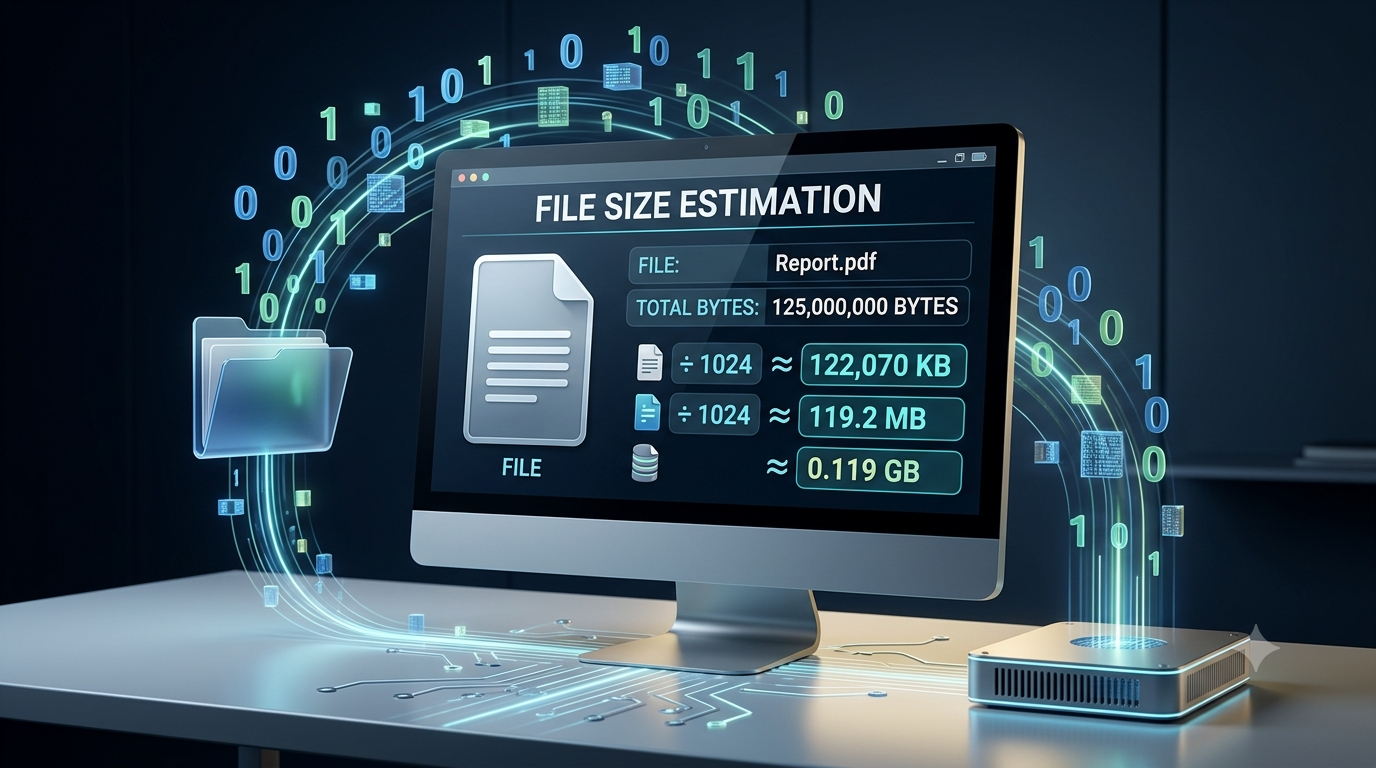
This value can be converted into larger units to make it easier to understand. Instead of describing a file using thousands or millions of bytes, computers commonly display sizes in kilobytes, megabytes, gigabytes, and terabytes.
The conversion method depends on whether decimal or binary units are being used.
3. Understanding the Units of Digital Storage
Digital storage units allow us to express large quantities of bytes in a compact form.
3.1 Byte (B)
A byte is the basic unit used in common file-size measurements.
1 byte = 8 bits
A small text file may contain only a few hundred bytes, while a high-resolution image or video can occupy millions or billions of bytes.
3.2 Kilobyte (KB)
In the decimal system, one kilobyte is equal to 1,000 bytes.
Formula:
Kilobytes = Number of Bytes ÷ 1,000
For example, a file containing 25,000 bytes has a decimal size of:
25,000 ÷ 1,000 = 25 KB
Some computer systems use the binary unit kibibyte (KiB), which equals 1,024 bytes. This distinction explains why different applications may report slightly different sizes.
3.3 Megabyte (MB)
A megabyte is commonly used to describe photographs, documents, music files, and small applications.
In the decimal system:
1 MB = 1,000,000 bytes
Formula:
Megabytes = Number of Bytes ÷ 1,000,000
For example, a file containing 4,000,000 bytes has a decimal size of:
4,000,000 ÷ 1,000,000 = 4 MB
In the binary system, one mebibyte (MiB) equals 1,048,576 bytes.
3.4 Gigabyte (GB)
Gigabytes are useful for measuring large files, software packages, games, and video collections.
In the decimal system:
1 GB = 1,000,000,000 bytes
Formula:
Gigabytes = Number of Bytes ÷ 1,000,000,000
For example, a file containing 2,500,000,000 bytes has a decimal size of:
2,500,000,000 ÷ 1,000,000,000 = 2.5 GB
The binary equivalent is the gibibyte (GiB), which equals 1,073,741,824 bytes.
3.5 Terabyte (TB)
Terabytes are used to describe very large quantities of stored data, such as extensive video libraries, backups, and storage devices.
In the decimal system:
1 TB = 1,000,000,000,000 bytes
Formula:
Terabytes = Number of Bytes ÷ 1,000,000,000,000
For example, 3,000,000,000,000 bytes equals 3 TB in the decimal system.
The binary equivalent, the tebibyte (TiB), equals 1,099,511,627,776 bytes.
4. Decimal and Binary File-Size Calculations
One important detail in estimating file size is the difference between decimal and binary measurement systems.
The decimal system uses powers of 1,000, while the binary system uses powers of 1,024.
| Unit | Decimal value | Binary value |
|---|---|---|
| Kilobyte (KB) | 1,000 bytes | Not the standard binary unit |
| Kibibyte (KiB) | Not the standard decimal unit | 1,024 bytes |
| Megabyte (MB) | 1,000,000 bytes | Not the standard binary unit |
| Mebibyte (MiB) | Not the standard decimal unit | 1,048,576 bytes |
| Gigabyte (GB) | 1,000,000,000 bytes | Not the standard binary unit |
| Gibibyte (GiB) | Not the standard decimal unit | 1,073,741,824 bytes |
The table distinguishes the decimal units KB, MB, and GB from the binary units KiB, MiB, and GiB.
Example: Converting the Same File into Different Units
Suppose a file contains 10,485,760 bytes.
Using decimal units:
10,485,760 ÷ 1,000,000 = 10.48576 MB
Using binary units:
10,485,760 ÷ 1,048,576 = 10 MiB
Therefore, the same file can be described as approximately 10.49 MB or exactly 10 MiB.
Both values describe the same number of bytes, but they use different measurement systems.
5. Step-by-Step Method to Estimate File Size
You can estimate a file’s size by following a simple process.
Step 1: Find the Total Number of Bytes
First, identify how many bytes the file contains. A file manager, programming language, or operating system can provide this information.
For example:
Stored bytes = 6,000,000
Step 2: Choose the Required Unit
Decide whether you want the size in kilobytes, megabytes, gigabytes, or another unit.
For a file containing several million bytes, megabytes may be the most convenient choice.
Step 3: Apply the Conversion Formula
For decimal megabytes:
File Size in MB = Number of Bytes ÷ 1,000,000
Substitute the given value:
6,000,000 ÷ 1,000,000 = 6 MB
Step 4: Round the Result if Necessary
File sizes do not always produce whole numbers. You can round the result to two decimal places when an approximate value is sufficient.
For example, 6,250,000 bytes equals 6.25 MB in the decimal system.
Rounding makes the result easier to read without changing the original number of stored bytes.
6. Practical Examples of File-Size Estimation
Let us examine a few examples to understand how the formulas work in practical situations.
Example 1: Estimating the Size of a Text File
Suppose a text file occupies 18,000 bytes.
To convert the file size into decimal kilobytes:
Size in KB = 18,000 ÷ 1,000
Size in KB = 18 KB
Therefore, the file occupies 18,000 bytes, equivalent to 18 KB in decimal units.
Example 2: Estimating the Size of an Image
Suppose an image contains 3,750,000 stored bytes.
To calculate its decimal size in megabytes:
Size in MB = 3,750,000 ÷ 1,000,000
Size in MB = 3.75 MB
The image therefore occupies 3.75 MB in decimal units.
Its actual size depends on the image format, resolution, color information, and compression method. The byte count already reflects the storage used by the particular saved file.
Example 3: Estimating the Size of a Video
Suppose a video file contains 1,800,000,000 bytes.
Using decimal gigabytes:
Size in GB = 1,800,000,000 ÷ 1,000,000,000
Size in GB = 1.8 GB
The video file has a size of 1.8 GB in decimal units.
This calculation measures the stored file size. It does not tell us the video’s duration or quality unless additional information is available.
Example 4: Estimating the Total Size of Multiple Files
Suppose a folder contains three files with the following sizes:
File A: 2,000,000 bytes
File B: 3,500,000 bytes
File C: 4,500,000 bytes
The total number of bytes is:
Total Bytes = 2,000,000 + 3,500,000 + 4,500,000
Total Bytes = 10,000,000
Converting this value into decimal megabytes:
10,000,000 ÷ 1,000,000 = 10 MB
Therefore, the combined data size of the three files is 10 MB.
This method is useful when estimating the size of folders, backups, downloads, and data collections.
7. How Can File Size Be Estimated from the Number of Bits?
Although file sizes are usually expressed in bytes, some situations provide the data quantity in bits.
Since one byte contains eight bits, the number of bytes can be calculated by dividing the total bits by eight.
Formula:
Number of Bytes = Number of Bits ÷ 8
For example, suppose a data file contains 80,000 bits.
Number of Bytes = 80,000 ÷ 8
Number of Bytes = 10,000 bytes
Converting this value into decimal kilobytes:
10,000 ÷ 1,000 = 10 KB
Therefore, 80,000 bits correspond to 10,000 bytes, or 10 KB in decimal units.
This distinction is especially important in networking, where data rates are often expressed in bits per second, while file sizes are commonly expressed in bytes.
8. Does the Number of Bytes Always Represent the Entire Storage Used?
The number of bytes in a file usually represents its logical file size, but it may not always equal the physical storage space consumed on a device.
Several factors can create a difference.
8.1 File-System Allocation
Some file systems allocate storage in blocks or clusters. A small file may occupy an entire allocation unit even if the file contains fewer bytes.
For example, a file containing 1,000 bytes may occupy a larger amount of physical storage if the file system allocates space in 4,096-byte units.
The file’s logical size remains 1,000 bytes, but its allocated storage may be 4,096 bytes.
8.2 File Metadata
File systems store additional information about files, such as names, timestamps, permissions, and storage locations. This metadata can consume space beyond the file’s actual contents.
The amount of metadata depends on the file system and its implementation.
8.3 Compression
Compression reduces the number of bytes required to represent data when the file is saved in a compressed format.
For example, a document may occupy 10 MB before compression but only 4 MB after compression. The stored size of the compressed file is 4 MB, although the file may expand to 10 MB when decompressed.
Therefore, when estimating the size of an existing file, use its actual stored byte count rather than assuming a particular compression ratio.
8.4 Sparse Files
Some file systems support sparse files, which can represent large logical files without physically storing every byte of their contents.
As a result, the logical file size can be significantly greater than the physical storage allocated to the file.
These examples demonstrate why logical file size and actual disk usage should not always be treated as identical measurements.
9. Why Is Estimating File Size Important?
Estimating file size from stored bytes is useful in several areas of computing.
9.1 Storage Management
Knowing file sizes helps users determine how much storage is occupied and whether there is enough space for new files, applications, or backups.
9.2 Network Transfers
File size helps estimate how much data must be transferred over a network. When the available data-transfer rate is known, the file size can be used to estimate a theoretical transfer time.
For a simplified estimate:
Transfer Time = File Size in Bits ÷ Data Rate in Bits per Second
For example, transferring 8,000,000 bits over a connection operating at 2,000,000 bits per second would take approximately four seconds under ideal conditions.
Actual transfer times may be longer because of network overhead, congestion, protocol behavior, and variations in connection speed.
9.3 Database Management
Database systems store records, images, documents, and other information. Estimating byte counts helps developers plan storage requirements and understand the size of stored records.
However, indexes, metadata, and database overhead can increase the total storage needed.
9.4 Software Development
Programmers frequently calculate file sizes when handling uploads, processing data, validating files, or setting storage limits.
For example, an application might reject an upload if its size exceeds a specified number of bytes.
9.5 Data Backup and Cloud Storage
Estimating file sizes helps users calculate approximate backup requirements and plan cloud-storage usage. For large collections, adding the sizes of individual files provides a useful starting point.
The final amount of storage used may differ because of version history, replication, compression, and service-specific storage rules.
10. Common Mistakes When Calculating File Size
Several mistakes can lead to incorrect estimates.
Confusing bits with bytes: One byte equals eight bits. Dividing or multiplying by eight incorrectly can create a large calculation error.
Mixing decimal and binary units: Dividing by 1,000,000 gives decimal megabytes, while dividing by 1,048,576 gives mebibytes.
Assuming every character uses one byte: Text encoding determines how many bytes are required for each character. Some characters require multiple bytes.
Ignoring compression: The stored size of a compressed file may differ considerably from the size of the original uncompressed data.
Confusing file size with disk usage: Allocation units and file-system metadata can cause physical storage usage to differ from logical file size.
To avoid these mistakes, always identify the original unit, select the appropriate conversion system, and distinguish the file’s byte count from its physical storage allocation.
Conclusion
The size of a file can be estimated directly from the number of bytes stored in it. The basic method is to identify the byte count and divide it by the appropriate conversion factor to express the result in kilobytes, megabytes, gigabytes, or terabytes. Decimal conversions use powers of 1,000, while binary conversions use powers of 1,024 and the corresponding units KiB, MiB, and GiB.
Understanding these calculations helps with storage management, networking, database design, software development, and data backup planning. However, the logical size of a file may differ from its physical storage usage because of file-system allocation, metadata, compression, or sparse-file behavior. By using the correct units and formulas, anyone can estimate file sizes accurately and understand what those measurements represent.
FAQs
1. How can the size of a file be estimated from the number of stored bytes?
The size of a file can be estimated by dividing its total number of stored bytes by the appropriate conversion factor. For decimal kilobytes, divide the number of bytes by 1,000. For decimal megabytes, divide by 1,000,000. For decimal gigabytes, divide by 1,000,000,000. For example, a file containing 5,000,000 bytes has a size of 5 MB in the decimal system. This calculation provides the file’s logical size. The actual physical storage used may be different because of file-system allocation, metadata, compression, or other storage-related factors.
2. What is the basic formula for calculating file size?
The basic formula is: File Size = Total Number of Stored Bytes. This formula expresses the file’s size in bytes without requiring any conversion. For example, if a document contains 25,000 bytes, its file size is 25,000 bytes. To express this value in another unit, divide it by the appropriate conversion factor. For decimal kilobytes, divide by 1,000; for decimal megabytes, divide by 1,000,000. This method is useful for estimating the sizes of documents, images, videos, software files, and other types of digital data stored on a computer.
3. How many bytes are there in one kilobyte?
In the decimal measurement system, one kilobyte (KB) equals 1,000 bytes. This system is commonly used by storage manufacturers and for standard decimal file-size calculations. However, computers also use binary measurements. One kibibyte (KiB) equals 1,024 bytes. These units are different, even though some applications informally use the term kilobyte when displaying binary-based values. For example, 10,000 bytes equals 10 KB in decimal units but approximately 9.77 KiB in binary units. Understanding this distinction helps users interpret file sizes correctly and avoid confusion when comparing storage information displayed by different devices or applications.
4. What is the difference between MB and MiB?
MB stands for megabyte, while MiB stands for mebibyte. A decimal megabyte equals 1,000,000 bytes, whereas a binary mebibyte equals 1,048,576 bytes. Both units measure digital information, but they use different conversion systems. For example, a file containing 10,485,760 bytes equals 10 MiB or approximately 10.49 MB. This difference becomes more noticeable when measuring large files or storage capacities. Using the correct unit is important when calculating storage requirements, comparing file sizes, or interpreting technical information. Always check whether an application uses decimal or binary units before comparing its reported measurements.
5. Can file size be calculated from the number of bits?
Yes, file size can be calculated from bits by dividing the total number of bits by eight because one byte contains eight bits. The formula is: Number of Bytes = Number of Bits ÷ 8. For example, a file containing 160,000 bits contains 20,000 bytes. To convert this value into decimal kilobytes, divide 20,000 by 1,000, giving 20 KB. This calculation is particularly useful in computer networking and digital communication, where data quantities and transfer rates are often expressed in bits. Remember that bits and bytes are different units and should not be used interchangeably.
6. Does every character in a text file occupy one byte?
No, every character in a text file does not necessarily occupy one byte. The number of bytes required depends on the character encoding used to represent the text. In ASCII, each supported character is represented using one byte in its standard byte-oriented representation. In UTF-8, common English characters usually require one byte, while many other characters may require two, three, or four bytes. Therefore, the size of a text file depends on its character count, encoding, and any additional formatting or metadata. To estimate its size accurately, use the actual stored byte count rather than assuming that every character occupies one byte.
7. Why is a file’s size sometimes different from the storage space it occupies?
A file’s logical size may differ from the physical storage space it occupies because of how the file system manages data. Storage devices commonly allocate space in blocks or clusters. A small file may therefore consume an entire allocation unit even when its contents require fewer bytes. File-system metadata can also use additional space. In other cases, compression or sparse-file techniques may reduce the physical storage required compared with the file’s logical size. For this reason, the byte count of a file and the storage space reported as used on a device are related measurements, but they are not always identical.
8. How can the total size of multiple files be estimated?
The total size of multiple files can be estimated by adding the stored byte counts of all the files. Once the total number of bytes is calculated, divide it by the appropriate conversion factor to express the result in kilobytes, megabytes, or gigabytes. For example, if three files contain 2,000,000 bytes, 3,000,000 bytes, and 5,000,000 bytes, their combined size is 10,000,000 bytes, equivalent to 10 MB in decimal units. This method is useful for estimating folder sizes, planning backups, organizing downloads, and calculating approximate storage requirements for collections of digital files.
9. How does file compression affect the estimated file size?
File compression changes the number of bytes needed to store data. Compression methods reduce file size by representing information more efficiently, although the amount of reduction depends on the data and the method used. For example, a document that originally occupies 8 MB might occupy 3 MB after compression. In that case, the compressed file’s stored size is 3 MB, while the uncompressed version may require approximately 8 MB. Some files, such as already compressed images and videos, may show little additional reduction. When estimating storage requirements, use the actual byte count of the version being stored or transferred.
10. Why is estimating file size important in computer science?
Estimating file size is important because it helps users and developers manage digital storage, plan data transfers, design databases, and control file uploads. Knowing the number of stored bytes makes it possible to estimate how much space a file requires and whether a device has sufficient capacity. In networking, file size can also help estimate transfer time when the data rate is known. Software applications use file-size calculations to enforce upload limits and process data efficiently. Accurate estimates are valuable for cloud storage, backups, and system planning. Understanding decimal and binary units makes these calculations more reliable and easier to interpret.