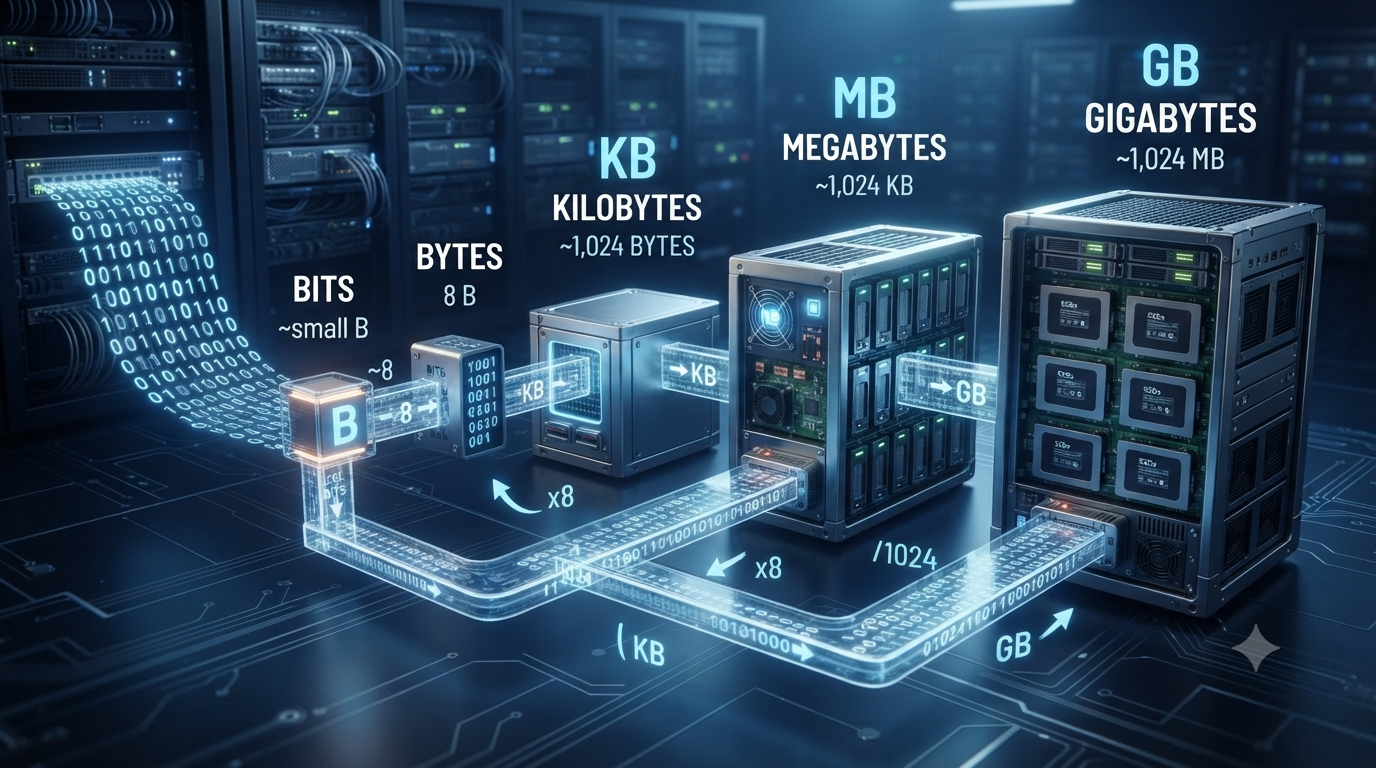
Digital information is measured using different units such as bits, bytes, kilobytes, megabytes, and gigabytes. These units are used to describe the size of files, the capacity of storage devices, the amount of data transferred over a network, and the memory available in a computer or other digital device.
For example, a small text file may contain only a few kilobytes of data, while a high-quality photograph may require several megabytes. A movie can occupy several gigabytes of storage, and a modern computer may have hundreds of gigabytes or even several terabytes of storage.
Understanding how these units relate to one another makes it easier to compare file sizes, calculate storage requirements, and understand data transfer speeds. The basic relationship starts with the bit and byte and then progresses to larger units such as kilobytes, megabytes, and gigabytes.
What Is a Bit?
A bit is the smallest basic unit of digital information. The word “bit” comes from binary digit.
A bit can have one of two possible values:
0
1
Computers use these two values because digital systems operate using binary states. A bit can represent whether something is on or off, true or false, or one of two possible electrical states.
Bits are commonly represented using a lowercase b.
For example:
8 bits = 1 byte
Bits are especially common when describing network speeds. Internet connections are often advertised in megabits per second (Mbps) or gigabits per second (Gbps).
What Is a Byte?
A byte is a group of 8 bits.
The basic relationship is:
1 byte = 8 bits
Bytes are represented using an uppercase B.
For example:
16 bits = 2 bytes
because:
16 ÷ 8 = 2 bytes
Bytes are commonly used to describe the size of computer files and digital storage. A text document, image, video, application, or other file is usually measured in bytes or larger units based on bytes.
It is important not to confuse b and B.
b = bit
B = byte
Therefore:
1 B = 8 b
This difference becomes particularly important when comparing internet speed with file size.
What Is a Kilobyte?
A kilobyte (KB) is a larger unit of digital information based on bytes.
In the decimal system commonly used for storage measurements:
1 kilobyte = 1,000 bytes
Therefore:
1 KB = 1,000 B
Since one byte contains 8 bits:
1 KB = 8,000 bits
For example, if a file has a size of 5 KB:
5 KB = 5 × 1,000 bytes
5 KB = 5,000 bytes
And in bits:
5,000 × 8 = 40,000 bits
So:
5 KB = 40,000 bits
Kilobyte and Kibibyte
You may also encounter the term kibibyte (KiB). It is different from a kilobyte.
A kibibyte is defined using powers of 2:
1 KiB = 1,024 bytes
A kilobyte, when used in the decimal system, is:
1 KB = 1,000 bytes
Both terms are valid, but they are used in different measurement systems.
What Is a Megabyte?
A megabyte (MB) is a larger unit commonly used to measure the size of images, documents, applications, audio files, and other digital content.
Using decimal units:
1 megabyte = 1,000 kilobytes
Therefore:
1 MB = 1,000 KB
Since 1 KB is 1,000 bytes:
1 MB = 1,000,000 bytes
And because each byte contains 8 bits:
1 MB = 8,000,000 bits
For example, a 6 MB image contains:
6 × 1,000,000 = 6,000,000 bytes
Therefore:
6 MB = 6,000,000 bytes
and:
6 MB = 48,000,000 bits
Megabytes are commonly used for files such as photographs, PDFs, songs, and small software applications.
What Is a Gigabyte?
A gigabyte (GB) is larger than a megabyte and is commonly used to describe the capacity of storage devices and the size of large files.
Using decimal units:
1 gigabyte = 1,000 megabytes
Therefore:
1 GB = 1,000 MB
Since 1 MB equals 1,000,000 bytes:
1 GB = 1,000,000,000 bytes
In bits:
1 GB = 8,000,000,000 bits
For example, a 4 GB file contains:
4 × 1,000,000,000 = 4,000,000,000 bytes
So:
4 GB = 4 billion bytes
Gigabytes are commonly used to describe the capacity of smartphones, memory cards, SSDs, hard drives, and other storage devices.
Basic Conversion Relationships
The easiest way to understand these units is to remember their basic relationships.
Using decimal units:
1 byte = 8 bits
1 KB = 1,000 bytes
1 MB = 1,000 KB
1 GB = 1,000 MB
This creates a simple conversion chain:
Bits → Bytes → Kilobytes → Megabytes → Gigabytes
When moving from a larger unit to a smaller unit, multiply.
When moving from a smaller unit to a larger unit, divide.
How to Convert Bits to Bytes
To convert bits into bytes, divide the number of bits by 8.
Bytes = Bits ÷ 8
For example, suppose you have 64 bits.
64 ÷ 8 = 8 bytes
Therefore:
64 bits = 8 bytes
Another example:
800 bits ÷ 8 = 100 bytes
Therefore:
800 bits = 100 bytes
How to Convert Bytes to Bits
To convert bytes into bits, multiply the number of bytes by 8.
Bits = Bytes × 8
For example:
25 bytes × 8 = 200 bits
Therefore:
25 bytes = 200 bits
If a file contains 500 bytes:
500 × 8 = 4,000 bits
So:
500 bytes = 4,000 bits
How to Convert Kilobytes to Bytes
To convert kilobytes to bytes using the decimal system, multiply by 1,000.
Bytes = Kilobytes × 1,000
For example:
7 KB × 1,000 = 7,000 bytes
Therefore:
7 KB = 7,000 bytes
To convert bytes back into kilobytes, divide by 1,000.
Kilobytes = Bytes ÷ 1,000
For example:
15,000 bytes ÷ 1,000 = 15 KB
Therefore:
15,000 bytes = 15 KB
How to Convert Megabytes to Kilobytes
To convert megabytes to kilobytes, multiply by 1,000.
Kilobytes = Megabytes × 1,000
For example:
8 MB × 1,000 = 8,000 KB
Therefore:
8 MB = 8,000 KB
To convert kilobytes to megabytes, divide by 1,000.
Megabytes = Kilobytes ÷ 1,000
For example:
12,000 KB ÷ 1,000 = 12 MB
Therefore:
12,000 KB = 12 MB
How to Convert Gigabytes to Megabytes
To convert gigabytes into megabytes, multiply by 1,000.
Megabytes = Gigabytes × 1,000
For example:
5 GB × 1,000 = 5,000 MB
Therefore:
5 GB = 5,000 MB
To convert megabytes into gigabytes, divide by 1,000.
Gigabytes = Megabytes ÷ 1,000
For example:
7,500 MB ÷ 1,000 = 7.5 GB
Therefore:
7,500 MB = 7.5 GB
Converting Between Any Two Units
You do not always need to convert through every unit one at a time. You can use the appropriate multiplication or division factor.
For example, to convert gigabytes directly into bytes:
1 GB = 1,000,000,000 bytes
Therefore:
3 GB = 3,000,000,000 bytes
To convert megabytes directly into bytes:
1 MB = 1,000,000 bytes
Therefore:
2.5 MB = 2,500,000 bytes
Similarly, to convert gigabytes into bits:
1 GB = 8,000,000,000 bits
Therefore:
2 GB = 16,000,000,000 bits
Decimal and Binary Data Units
One reason digital storage conversions can sometimes appear confusing is that two different measurement systems are used.
The decimal system uses powers of 10:
1 KB = 1,000 bytes
1 MB = 1,000,000 bytes
1 GB = 1,000,000,000 bytes
The binary system uses powers of 2:
1 KiB = 1,024 bytes
1 MiB = 1,024 KiB
1 GiB = 1,024 MiB
The binary units have specific names:
KiB = kibibyte
MiB = mebibyte
GiB = gibibyte
For basic file and storage calculations, it is important to check which system is being used.
Common Examples of Digital Data Sizes
Different types of digital information can have very different sizes.
A simple text file may be only a few kilobytes. A high-resolution photograph may require several megabytes. A music file may also be several megabytes, depending on its format and quality.
A high-definition video can require hundreds of megabytes or several gigabytes. Large software applications and modern video games can require tens or even hundreds of gigabytes.
The actual size depends on factors such as file format, resolution, compression, quality, duration, and the amount of information stored.
Bits and Bytes in Internet Speed
Bits and bytes become especially important when discussing internet connections.
Internet speeds are normally expressed in bits per second, such as:
Kbps = kilobits per second
Mbps = megabits per second
Gbps = gigabits per second
File sizes, on the other hand, are normally expressed using bytes:
KB = kilobytes
MB = megabytes
GB = gigabytes
For example, suppose an internet connection provides a speed of 100 Mbps.
Since 1 byte equals 8 bits:
100 Mbps ÷ 8 = 12.5 MB/s
So a theoretical 100 Mbps connection can transfer approximately 12.5 megabytes per second under ideal conditions.
Actual download speeds may be lower because of network conditions, server limitations, protocol overhead, Wi-Fi performance, and other factors.
A Simple Conversion Table
| Unit | Decimal Equivalent |
|---|---|
| 1 byte | 8 bits |
| 1 KB | 1,000 bytes |
| 1 MB | 1,000 KB |
| 1 GB | 1,000 MB |
| 1 MB | 1,000,000 bytes |
| 1 GB | 1,000,000,000 bytes |
| 1 MB | 8,000,000 bits |
| 1 GB | 8,000,000,000 bits |
This table can be used as a quick reference when performing basic digital data conversions.
Worked Conversion Examples
Example 1: Convert 40 bits to bytes
Use:
Bytes = Bits ÷ 8
40 ÷ 8 = 5
Therefore:
40 bits = 5 bytes
Example 2: Convert 12 KB to bytes
Use:
Bytes = KB × 1,000
12 × 1,000 = 12,000
Therefore:
12 KB = 12,000 bytes
Example 3: Convert 4 MB to bytes
Use:
Bytes = MB × 1,000,000
4 × 1,000,000 = 4,000,000
Therefore:
4 MB = 4,000,000 bytes
Example 4: Convert 3 GB to MB
Use:
MB = GB × 1,000
3 × 1,000 = 3,000 MB
Therefore:
3 GB = 3,000 MB
Example 5: Convert 2 GB to bits
First convert gigabytes into bytes:
2 GB = 2,000,000,000 bytes
Then multiply by 8:
2,000,000,000 × 8 = 16,000,000,000 bits
Therefore:
2 GB = 16,000,000,000 bits
Common Mistakes When Converting Data Units
One common mistake is confusing bits with bytes. Remember that a lowercase b represents a bit, while an uppercase B represents a byte.
Another common mistake is assuming that every conversion uses 1,024. The decimal system uses 1,000, while binary units use 1,024.
It is also easy to multiply when you should divide. A useful rule is:
Large unit → small unit = multiply
Small unit → large unit = divide
For example:
GB → MB = multiply by 1,000
MB → GB = divide by 1,000
Following this rule makes many conversions straightforward.
Why Understanding Data Conversion Is Important
Understanding data units is useful in everyday digital life. It helps when comparing storage devices, checking whether a file will fit on a memory card, estimating download times, understanding internet plans, and managing computer or smartphone storage.
It also provides a foundation for learning computer science and information technology. Concepts such as memory, storage, data transmission, networking, file sizes, and data compression all depend on understanding how digital information is measured.
The distinction between bits and bytes is particularly important because network speeds and file sizes use different units. Knowing the difference can prevent confusion when estimating how long it may take to download or upload a file.
Conclusion
Bits, bytes, kilobytes, megabytes, and gigabytes are fundamental units used to measure digital information. A bit is the smallest basic unit and can have a value of 0 or 1, while a byte consists of 8 bits. In the decimal system, 1 KB equals 1,000 bytes, 1 MB equals 1,000 KB, and 1 GB equals 1,000 MB.
The most important conversion rule is simple: multiply when converting from a larger unit to a smaller unit, and divide when converting from a smaller unit to a larger unit. It is also important to distinguish bits from bytes and decimal units from binary units.
Once these relationships are understood, converting digital data sizes becomes a simple and useful mathematical skill for working with computers, networks, files, and digital storage.
FAQs
1. What is the difference between a bit and a byte?
A bit is the smallest basic unit of digital information and can have a value of either 0 or 1. A byte is a group of 8 bits. Therefore, 1 byte equals 8 bits. Bits are commonly represented by a lowercase b, while bytes are represented by an uppercase B. This difference is important because internet speeds are usually measured in bits per second, such as Mbps, while file sizes and storage capacities are commonly measured in bytes, such as MB or GB. Understanding the difference between bits and bytes helps avoid confusion when comparing internet speeds, file sizes, and storage capacities.
2. How many bits are in one byte?
One byte contains exactly 8 bits. This is a fundamental relationship used when converting between bits and bytes. To convert bytes into bits, multiply the number of bytes by 8. For example, 10 bytes contain 80 bits because 10 × 8 = 80. To convert bits into bytes, divide the number of bits by 8. For example, 64 bits equal 8 bytes because 64 ÷ 8 = 8. This relationship is useful when working with computer memory, file sizes, data transmission, and network speeds. Always remember that a lowercase b represents a bit, while an uppercase B represents a byte.
3. How many bytes are in one kilobyte?
In the decimal measurement system, 1 kilobyte (KB) equals 1,000 bytes. Therefore, to convert kilobytes into bytes, multiply the number of kilobytes by 1,000. For example, 5 KB equals 5,000 bytes. To convert bytes back into kilobytes, divide the number of bytes by 1,000. It is important to note that computers also use binary units. In that system, 1 kibibyte (KiB) equals 1,024 bytes. KB and KiB are therefore not exactly the same. Storage manufacturers commonly use decimal units such as KB, MB, and GB, while binary measurements are often used in computing contexts.
4. How many kilobytes are in one megabyte?
Using the decimal system, 1 megabyte (MB) equals 1,000 kilobytes (KB). To convert megabytes into kilobytes, multiply the number of megabytes by 1,000. For example, 4 MB equals 4,000 KB. To convert kilobytes into megabytes, divide by 1,000. For example, 7,500 KB equals 7.5 MB. There is also a binary measurement system in which 1 mebibyte (MiB) equals 1,024 kibibytes (KiB). Therefore, it is useful to check whether a measurement is using decimal or binary units. For most basic storage calculations, decimal conversions are straightforward and widely used.
5. How many megabytes are in one gigabyte?
In the decimal system, 1 gigabyte (GB) equals 1,000 megabytes (MB). To convert gigabytes into megabytes, multiply the number of gigabytes by 1,000. For example, 3 GB equals 3,000 MB. To convert megabytes into gigabytes, divide by 1,000. For example, 2,500 MB equals 2.5 GB. In the binary system, the corresponding unit is a gibibyte (GiB), which equals 1,024 mebibytes (MiB). This distinction can sometimes explain why the capacity displayed by a computer appears slightly different from the advertised capacity of a storage device.
6. How do you convert bits into bytes?
To convert bits into bytes, divide the number of bits by 8 because one byte contains eight bits. The formula is: Bytes = Bits ÷ 8. For example, if you have 200 bits, divide 200 by 8 to get 25 bytes. Therefore, 200 bits equals 25 bytes. The reverse conversion is also simple. To convert bytes into bits, multiply the number of bytes by 8. For example, 25 bytes × 8 equals 200 bits. This conversion is particularly useful when comparing internet speeds, which are normally measured in bits, with file sizes, which are usually measured in bytes.
7. How do you convert gigabytes into bytes?
To convert gigabytes into bytes using the decimal system, multiply the number of gigabytes by 1,000,000,000. This is because 1 GB equals 1,000 MB, and 1 MB equals 1,000,000 bytes. Therefore, 1 GB equals 1,000,000,000 bytes. For example, 2 GB equals 2,000,000,000 bytes. The calculation is: 2 × 1,000,000,000 = 2,000,000,000 bytes. If you are working with binary units, 1 GiB equals 1,073,741,824 bytes. Therefore, always check whether the value is given in GB or GiB before performing an exact conversion.
8. Why are internet speeds measured in bits instead of bytes?
Internet speeds are commonly measured in bits per second, such as Mbps and Gbps, because data transmission is traditionally described in terms of individual binary bits. File sizes, storage capacities, and memory are generally expressed using bytes, such as MB and GB. Since one byte equals eight bits, a connection advertised at 100 Mbps has a theoretical maximum transfer rate of about 12.5 MB per second before accounting for network overhead and other limitations. This is why a 100 Mbps internet connection does not normally download a file at 100 MB per second. Understanding bits versus bytes makes internet speed easier to interpret.
9. What is the difference between GB and GiB?
GB and GiB represent different units of digital information. GB stands for gigabyte and uses the decimal system. One GB equals 1,000,000,000 bytes. GiB stands for gibibyte and uses the binary system. One GiB equals 1,073,741,824 bytes, which is 1,024³ bytes. Although the terms are sometimes used interchangeably in everyday computing, they are technically different. Storage manufacturers commonly use GB for advertised capacity, while some operating systems and technical applications may display storage using binary-based calculations. Knowing the difference can help explain small differences between advertised and displayed storage capacities.
10. What is the easiest way to remember data unit conversions?
A simple way to remember decimal data conversions is to follow the sequence bits → bytes → kilobytes → megabytes → gigabytes. Remember that 8 bits make 1 byte, while each larger decimal unit is 1,000 times the previous byte-based unit. When converting from a larger unit to a smaller unit, multiply. When converting from a smaller unit to a larger unit, divide. Also remember that lowercase b means bit and uppercase B means byte. For example, 1 MB equals 1,000 KB, while 1,000 KB equals 1 MB. These basic rules make most everyday data conversions easy.