Standard Form to Decimal Converter
Convert numbers written in scientific notation into ordinary decimal form.
Examples: 4.2 × 10^3, 6.7e-4, 8 × 10⁵, or -2.5e2. Use e notation for very large or small exponents.
A Standard Form to Decimal Converter is an online tool that changes numbers written in standard form into ordinary decimal numbers. It is useful for students, teachers, science enthusiasts, and anyone who works with very large or very small numbers. Instead of moving the decimal point manually and counting the required places, you can enter a number in standard form and obtain its decimal equivalent within seconds.
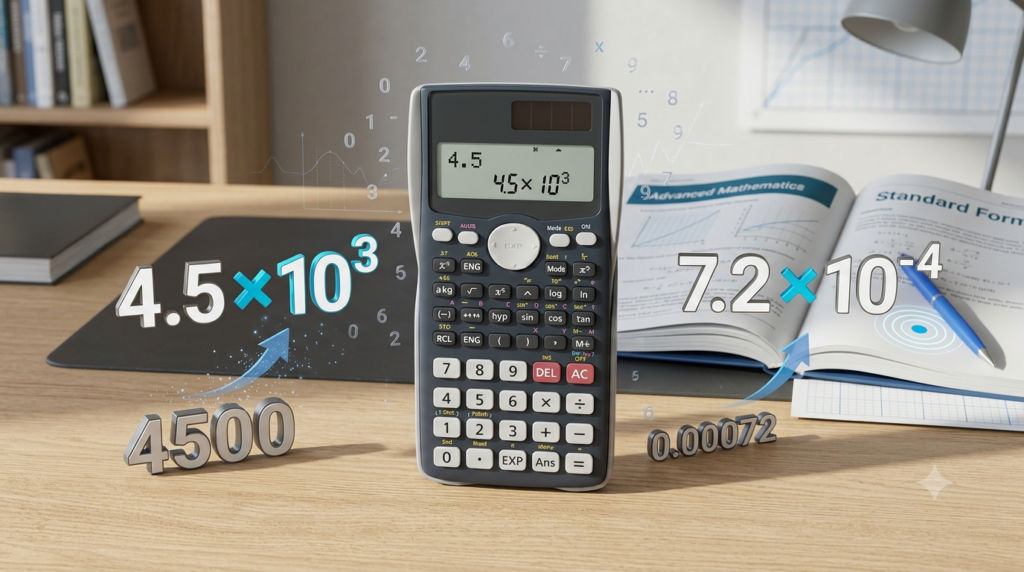
Standard form, also known as scientific notation, is a convenient way to represent numbers using powers of 10. For example, the number 45,000 can be written as 4.5 × 10⁴, while 0.00072 can be written as 7.2 × 10⁻⁴. Although these expressions represent the same values as their decimal forms, they use a shorter and more convenient notation.
This Standard Form to Decimal Converter makes the conversion process simple. Enter a number such as 3.5 × 10⁴ or 6.7e-4, click the convert button, and the tool displays the corresponding decimal number. It is designed to make calculations easier and help users understand how standard form works.
What Is a Standard Form to Decimal Converter?
A Standard Form to Decimal Converter is a mathematical tool that converts numbers expressed in scientific notation into their ordinary decimal representation.
In standard form, a number is generally written as:
a × 10ⁿ
Here, a is the coefficient or significant number, and n is an integer called the exponent. The coefficient is usually greater than or equal to 1 and less than 10 for positive numbers expressed in normalized standard form.
For example:
5.2 × 10³ = 5200
7.4 × 10² = 740
3.6 × 10⁻² = 0.036
8.1 × 10⁻⁵ = 0.000081
The converter performs these calculations automatically. It interprets the coefficient and exponent, determines how the decimal point should move, and displays the resulting number.
This is particularly useful when working with scientific measurements, mathematical problems, astronomy, chemistry, physics, and other subjects in which numbers may contain many digits or several leading zeros.
How to Use the Standard Form to Decimal Converter
Using the converter is straightforward. You do not need to install software or perform the calculation manually.
Follow these steps to convert a number.
Step 1: Enter the Number in Standard Form
Type the number you want to convert into the input field.
For example, you can enter:
3.5 × 10⁴
6.7e-4
8 × 10⁵
-2.5e2
The letter e is a common way to represent multiplication by a power of 10 in calculators and computer applications. For example, 3.5e4 means 3.5 × 10⁴.
Step 2: Click the Convert Button
After entering the number, click the Convert to Decimal button. The tool processes the coefficient and exponent and calculates the decimal equivalent.
Step 3: Read the Decimal Result
The converted number appears in the result section.
For example, entering 3.5e4 produces 35000. Similarly, entering 6.7e-4 produces 0.00067.
Step 4: Copy the Result
If you need the converted number for homework, calculations, notes, or another document, use the Copy Result button. You can then paste the number wherever it is needed.
Step 5: Try Another Number
Use the Clear button to remove the previous input and enter a new number. The converter also includes example values that allow you to test different types of standard-form expressions quickly.
Understanding Standard Form and Decimal Form
Before exploring the conversion process, it is helpful to understand the difference between standard form and decimal form.
Standard Form
Standard form expresses a number as a coefficient multiplied by a power of 10.
For example:
6.25 × 10⁴
In this expression, 6.25 is the coefficient, 10 is the base, and 4 is the exponent. The exponent indicates that the coefficient must be multiplied by 10 four times.
Standard form makes large numbers shorter and easier to read. It is commonly used in scientific calculations, technical writing, and mathematical notation.
Decimal Form
Decimal form expresses a number using digits and a decimal point in its ordinary numerical representation.
For example:
62,500
This is the decimal form of 6.25 × 10⁴.
Decimal form is convenient for everyday calculations, prices, measurements, and situations in which the actual numerical value is required directly.
Why Convert Standard Form to Decimal Form?
Standard form is compact, but decimal form can be easier to understand when reading a numerical answer or entering a value into a calculation.
Converting between these forms helps users interpret scientific measurements, solve mathematical problems, and compare quantities.
For example, comparing 0.0003 and 0.00008 may require careful attention to the zeros. Their standard forms, 3 × 10⁻⁴ and 8 × 10⁻⁵, can make their relative sizes easier to recognize.
How Does the Conversion Work?
The conversion depends on whether the exponent is positive, negative, or zero.
Converting a Positive Exponent
When a number is multiplied by a positive power of 10, the decimal point moves to the right.
For example:
4.2 × 10³ = 4200
The exponent is 3, so the decimal point moves three places to the right.
Start with 4.2. Moving the decimal point one place gives 42. Moving it a second place gives 420. Moving it a third place gives 4200.
Therefore, the decimal equivalent is 4200.
Consider another example:
7.35 × 10² = 735
The exponent is 2, so the decimal point moves two places to the right.
When the original number does not contain enough digits to complete the movement, zeros are added as necessary.
For example:
5.6 × 10⁴ = 56000
The decimal point moves four places to the right, producing 56000.
Converting a Negative Exponent
When a number is multiplied by a negative power of 10, the decimal point moves to the left.
For example:
4.5 × 10⁻³ = 0.0045
The exponent is -3, so the decimal point moves three places to the left.
Starting with 4.5, moving the decimal point three places to the left produces 0.0045.
Another example is:
8.2 × 10⁻² = 0.082
The decimal point moves two places to the left. A zero is placed before the decimal point to represent a number smaller than 1.
Negative exponents are especially useful for expressing small measurements, including microscopic distances, tiny masses, and scientific quantities.
Converting an Exponent of Zero
Any nonzero number multiplied by 10⁰ remains unchanged because 10⁰ equals 1.
For example:
6.4 × 10⁰ = 6.4
Since multiplying by 1 does not change a number, the decimal equivalent is simply 6.4.
Standard Form to Decimal Conversion Examples
The following examples demonstrate how different exponents affect the result.
| Standard Form | Decimal Form |
|---|---|
| 2 × 10¹ | 20 |
| 3.4 × 10² | 340 |
| 5.6 × 10³ | 5600 |
| 7.25 × 10⁴ | 72500 |
| 9.1 × 10⁵ | 910000 |
| 4 × 10⁻¹ | 0.4 |
| 6.3 × 10⁻² | 0.063 |
| 2.5 × 10⁻³ | 0.0025 |
| 8.4 × 10⁻⁴ | 0.00084 |
| 1.7 × 10⁻⁶ | 0.0000017 |
Notice that positive exponents generally produce larger values when the coefficient is positive and the exponent is increased. Negative exponents produce smaller positive values when the coefficient is positive and the magnitude of the negative exponent increases.
These examples can help you check your calculations and become more familiar with scientific notation.
Features of the Standard Form to Decimal Converter
The converter is designed to provide a simple experience on both desktop and mobile devices.
1. Instant Conversion
Enter a valid number and click the conversion button to see its decimal equivalent. You do not need to calculate the movement of the decimal point manually.
2. Support for Positive and Negative Exponents
The tool handles positive exponents, such as 10⁴, and negative exponents, such as 10⁻⁴. This makes it useful for converting both large and small numerical values.
3. Negative Number Support
Numbers with negative coefficients can also be converted. For example, -2.5e2 is converted to -250.
4. Example Inputs
The example buttons let you load sample expressions into the input field. They are useful for learning the conversion process and testing the calculator without typing every expression yourself.
5. Copyable Results
The Copy Result button makes it convenient to reuse the decimal value in assignments, documents, calculations, and other applications.
6. Mobile-Friendly Design
The interface adapts to smaller screens. Input fields and buttons are designed to remain easy to use on smartphones and tablets.
7. No Installation Required
The converter runs directly in a compatible web browser. Users do not need to download a separate application or install a calculator program.
Applications of Standard Form to Decimal Conversion
Converting standard form into decimal form is useful in many areas of mathematics and science.
Mathematics
Students frequently encounter scientific notation when studying powers of 10, exponents, algebra, and scientific calculations. Converting numbers into decimal form helps them understand the actual values represented by mathematical expressions.
Physics
Physics uses extremely large and extremely small numbers to describe quantities such as distances, masses, energies, and particle dimensions.
For example, a measurement written as 3 × 10⁸ can be expressed in decimal form as 300000000. Converting such expressions helps readers interpret numerical values more directly.
Chemistry
Chemical calculations often involve very small quantities, including the masses and dimensions associated with atoms and molecules. Scientific notation provides a compact way to represent these measurements, while decimal conversion can help when reading or comparing numerical results.
Astronomy
Astronomy involves enormous distances, such as the distances between stars and galaxies. Standard form helps represent these values without writing long sequences of digits. Decimal conversion can be useful when an ordinary numerical representation is required.
Engineering and Technology
Engineers and technical professionals work with measurements that may span several orders of magnitude. Converting between standard form and decimal form helps them interpret specifications, numerical outputs, and calculations.
Education and Self-Learning
Learners can use the converter to check their answers after solving practice problems. Comparing manual calculations with the tool’s output can help identify errors involving decimal-point placement or the use of exponents.
Common Mistakes When Converting Standard Form
Although the conversion process is simple, a few mistakes can produce incorrect results.
Moving the Decimal Point in the Wrong Direction
A positive exponent moves the decimal point to the right, while a negative exponent moves it to the left.
For example, 3 × 10³ equals 3000, not 0.003. On the other hand, 3 × 10⁻³ equals 0.003, not 3000.
Always check the sign of the exponent before moving the decimal point.
Counting the Wrong Number of Places
The exponent determines how many places the decimal point moves.
For example, 2.4 × 10² equals 240. Moving the decimal point only one place would produce 24, which is incorrect.
Forgetting Leading Zeros
When converting small numbers, zeros may be necessary between the decimal point and the first nonzero digit.
For example, 5 × 10⁻⁴ equals 0.0005. The zeros are important because they determine the numerical value.
Confusing the Coefficient with the Exponent
In 7.2 × 10³, the coefficient is 7.2 and the exponent is 3. The exponent determines the decimal-point movement; it is not a number that should simply be added to the coefficient.
Using an Invalid Input Format
Enter a valid expression such as 4.5e3 or 4.5 × 10³. The letter e represents an exponent of 10 in calculator notation. If the expression is incomplete or contains an invalid exponent, the converter may not recognize it.
Tips for Getting Accurate Results
For reliable conversions, check the coefficient and exponent before entering the expression. Confirm whether the exponent is positive or negative, and make sure the number is written correctly.
You can use the following approach:
Identify the coefficient.
Identify the exponent of 10.
Determine the direction of decimal-point movement.
Count the number of places indicated by the exponent.
Check the resulting decimal number.
For example, when converting 6.25 × 10⁻³, the coefficient is 6.25 and the exponent is -3. Move the decimal point three places to the left to obtain 0.00625.
After using the converter, you can compare the output with your own calculation. This is an effective way to build confidence and improve your understanding of scientific notation.
Limitations of the Converter
The Standard Form to Decimal Converter is intended for ordinary numerical conversions involving powers of 10. It accepts common scientific-notation formats, including expressions written with the letter e.
However, extremely large positive or negative exponents can produce very long decimal strings. These results may be difficult to read or use in other applications.
As with any calculator, the accuracy of the result depends on entering the intended value correctly. For specialized scientific work that requires arbitrary-precision arithmetic or strict numerical precision, a dedicated high-precision calculator may be more appropriate.
For everyday educational calculations and many common scientific-notation conversions, this tool provides a convenient starting point.
Conclusion
The Standard Form to Decimal Converter is a practical tool for transforming scientific notation into ordinary decimal numbers. It simplifies calculations involving positive exponents, negative exponents, large values, and small values.
By entering a valid expression and clicking the conversion button, you can obtain a decimal result without manually counting the movement of the decimal point. The example inputs, copy function, and mobile-friendly interface make the tool useful for students, teachers, and anyone learning mathematics or science.
Understanding the relationship between standard form and decimal form remains important even when using an online converter. Learning how exponents affect decimal-point placement helps you check answers, avoid common mistakes, and develop a stronger foundation in scientific notation.
FAQs
1. What is a Standard Form to Decimal Converter?
A Standard Form to Decimal Converter is an online tool that converts numbers written in scientific notation into ordinary decimal numbers. Standard form represents a number using a coefficient multiplied by a power of 10. For example, 4.5 × 10³ represents 4500, while 6.2 × 10⁻³ represents 0.0062. The converter performs these calculations automatically, saving time and reducing errors when moving the decimal point. It is useful for students, teachers, and anyone working with mathematics, physics, chemistry, astronomy, or other scientific subjects that involve very large or very small numbers.
2. How do I convert standard form to decimal form?
To convert standard form to decimal form, first identify the coefficient and the exponent of 10. If the exponent is positive, move the decimal point to the right by the number of places indicated by the exponent. If the exponent is negative, move it to the left. For example, 3.2 × 10³ becomes 3200, while 3.2 × 10⁻³ becomes 0.0032. You can perform this calculation manually or enter the expression into an online Standard Form to Decimal Converter to obtain the result quickly.
3. What is the difference between standard form and decimal form?
Standard form expresses a number as a coefficient multiplied by a power of 10, whereas decimal form represents the number using ordinary digits and a decimal point. For example, 75,000 can be written as 7.5 × 10⁴ in standard form. Both expressions represent exactly the same value, but standard form is shorter and easier to manage when dealing with extremely large or small numbers. Decimal form is often more familiar in everyday calculations. A converter helps you switch between these representations whenever a calculation, assignment, or scientific explanation requires an ordinary numerical value.
4. How do positive exponents affect decimal conversion?
A positive exponent indicates that the coefficient must be multiplied by a positive power of 10. During conversion, the decimal point moves to the right by the number of places indicated by the exponent. For example, 5.6 × 10³ becomes 5600 because the decimal point moves three places to the right. If the coefficient does not contain enough digits to complete the movement, zeros are added. Positive exponents commonly represent large numbers, such as distances, populations, and scientific measurements. The converter automatically calculates the decimal equivalent without requiring you to move the decimal point manually.
5. How do negative exponents affect decimal conversion?
A negative exponent indicates that the coefficient is multiplied by a fraction involving a power of 10. During conversion, the decimal point moves to the left by the number of places indicated by the exponent. For example, 4.8 × 10⁻³ becomes 0.0048. Zeros may be needed between the decimal point and the first nonzero digit. Negative exponents are useful for expressing small quantities, including microscopic measurements and certain scientific values. The Standard Form to Decimal Converter handles negative exponents automatically, helping users obtain the correct decimal representation without manually counting decimal places.
6. Can I convert scientific notation using e notation?
Yes, the converter supports common e notation, which is frequently used in calculators, spreadsheets, and computer applications. In this notation, the letter e represents multiplication by a power of 10. For example, 3.5e4 means 3.5 × 10⁴ and equals 35000. Similarly, 6.7e-4 means 6.7 × 10⁻⁴ and equals 0.00067. This format is especially convenient when typing scientific notation on a keyboard that does not provide superscript characters. Enter the expression in the input field and click the conversion button to display its decimal equivalent.
7. Can I convert very small numbers into decimal form?
Yes, the converter can convert many numbers with negative exponents into ordinary decimal form. For example, 2.5 × 10⁻⁵ becomes 0.000025. These conversions are useful when working with small measurements in physics, chemistry, biology, and other scientific fields. The greater the magnitude of a negative exponent, the farther the decimal point moves to the left. Very small numbers may require several zeros before the first nonzero digit. Extremely large exponent magnitudes can produce lengthy results, so a high-precision calculator may be preferable for specialized calculations requiring additional numerical precision.
8. Can I convert negative numbers from standard form to decimal form?
Yes, negative numbers can also be converted from standard form into decimal form. The negative sign remains part of the result, while the exponent determines the direction and distance of decimal-point movement. For example, −2.5 × 10² becomes −250, while −2.5 × 10⁻² becomes −0.025. The coefficient’s sign does not change the rule for handling the exponent. Enter the negative number using the input field and click the conversion button. The converter displays the decimal equivalent, making it easier to check calculations involving negative values.
9. Is the Standard Form to Decimal Converter useful for students?
Yes, this converter can be useful for students learning scientific notation, powers of 10, exponents, and decimal numbers. It provides quick results that students can compare with their manual calculations. For example, after solving a problem involving 7.2 × 10⁴, a student can check whether the correct decimal answer is 72000. The tool can also help learners understand how positive and negative exponents affect decimal-point placement. However, students should practise the conversion method themselves rather than relying entirely on the calculator. Combining manual practice with the tool can improve accuracy and strengthen mathematical understanding.
10. Is the Standard Form to Decimal Converter free to use?
The Standard Form to Decimal Converter described on this page is designed to work directly in a web browser without requiring a separate application or software installation. If the website provides access to the tool without a payment requirement, visitors can use it freely for supported conversions. Users can enter standard-form numbers, view their decimal equivalents, try sample expressions, and copy results for use in other documents or calculations. The tool is suitable for everyday educational and general mathematical tasks. For specialized work involving exceptionally large numbers or strict precision requirements, users may need a dedicated high-precision calculator.