Number Base Converter
Convert numbers between binary, octal, decimal, hexadecimal, and custom number bases from 2 to 36.
Whole numbers only. Negative numbers are supported.
Conversion Results
This result follows your selected target base.
Ready to convert.
A Number Base Converter is a useful mathematical tool that converts a number from one number system to another. It allows you to convert numbers between binary, octal, decimal, hexadecimal, and other number bases without performing lengthy calculations manually. This tool is especially helpful for students, programmers, computer science learners, engineers, and anyone who wants to understand how different number systems work.
Different number systems are used in mathematics, computing, digital electronics, and information technology. For example, the decimal system is commonly used in everyday calculations, while computers use binary numbers to represent and process information. Programmers often work with hexadecimal and octal representations because they provide shorter ways to express certain binary values.
A Number Base Converter makes these conversions faster, easier, and more convenient. Instead of repeatedly calculating powers and remainders, you can enter a number, select its original base, and obtain the equivalent value in another base.
In this article, you will learn what a number base is, how a Number Base Converter works, the differences between common number systems, and how to convert numbers accurately.
What Is a Number Base Converter?
A Number Base Converter is a calculator that changes the representation of a number from one positional number system to another while preserving its numerical value.
A number system uses a particular set of digits to represent numbers. The number of unique digits available in that system determines its base, also called its radix.
For example:
Binary uses base 2.
Octal uses base 8.
Decimal uses base 10.
Hexadecimal uses base 16.
Consider the decimal number 10. Its equivalent representation in binary is 1010, in octal it is 12, and in hexadecimal it is A.
Although these representations look different, they all represent the same numerical value.
A Number Base Converter performs these transformations automatically. Depending on the tool, you can convert between common number systems or choose a custom base within a supported range.
What Is a Number Base?
A number base indicates how many different digit symbols a positional number system uses before moving to the next place value.
For example, the decimal system has ten digits, from 0 to 9. When the value exceeds 9, the next number is represented as 10.
Similarly, the binary system has only two digits, 0 and 1. After 1, the next number is 10, which represents the decimal value 2.
Every position in a positional number system represents a power of its base. The rightmost position represents the base raised to the power of zero, the next position represents the base raised to the power of one, and so on.
For example, the decimal number 345 can be expanded as:
345 = 3 × 10² + 4 × 10¹ + 5 × 10⁰
This means:
345 = 300 + 40 + 5
The same principle applies to binary, octal, hexadecimal, and other positional number systems. Only the base and the permitted digits change.
Understanding place values helps explain why the same numerical value can have different representations in different bases.
Common Number Systems Used in Base Conversion
1. Binary Number System (Base 2)
The binary number system uses only two digits: 0 and 1. It is the fundamental number system used by digital computers and electronic devices.
Each binary digit is called a bit. Binary numbers represent information through combinations of two possible states, commonly associated with electrical or logical states such as OFF and ON.
For example, the binary number 1010 represents the decimal number 10.
The calculation is:
1010₂ = 1 × 2³ + 0 × 2² + 1 × 2¹ + 0 × 2⁰
1010₂ = 8 + 0 + 2 + 0 = 10₁₀
Binary conversion is useful when learning computer fundamentals, digital logic, programming, and how computers represent information.
2. Octal Number System (Base 8)
The octal number system uses eight digits: 0, 1, 2, 3, 4, 5, 6, and 7.
It provides a shorter representation of binary numbers because every octal digit corresponds to exactly three binary digits.
For example:
Binary: 101 110
Octal: 56
The binary number 101110₂ is equivalent to 56₈, which represents the decimal value 46.
Octal notation has been used in computing, digital systems, and Unix-like file permission representations. Although hexadecimal is more common in many modern programming applications, octal remains useful in specific contexts.
3. Decimal Number System (Base 10)
The decimal number system is the standard number system used in everyday life. It contains ten digits: 0 through 9.
People use decimal numbers for counting, measuring, financial calculations, scientific measurements, and general arithmetic.
For example, the decimal number 527 represents:
527 = 5 × 10² + 2 × 10¹ + 7 × 10⁰
527 = 500 + 20 + 7
Because decimal notation is familiar to most people, it is frequently used as the starting point when learning other number systems.
4. Hexadecimal Number System (Base 16)
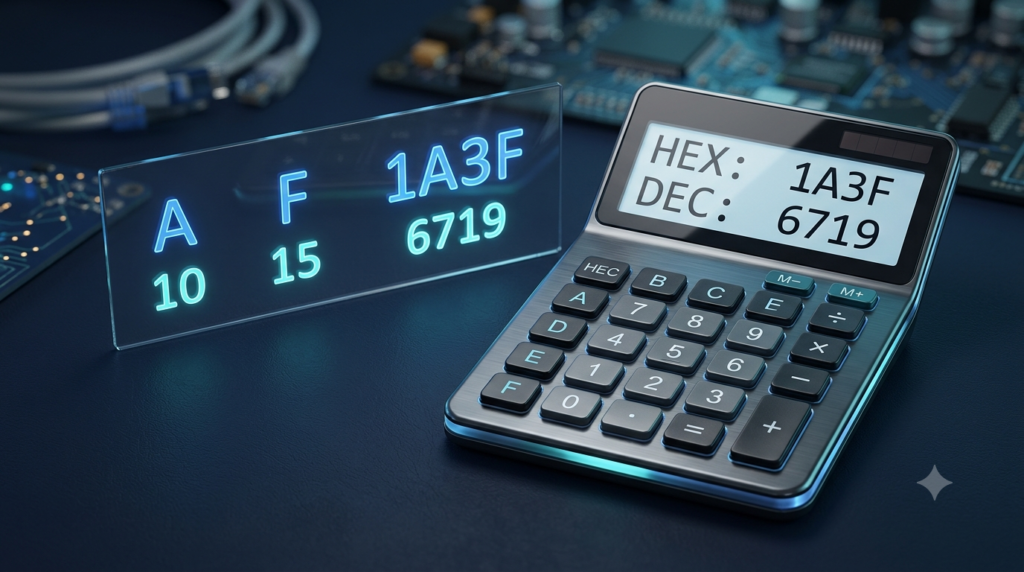
The hexadecimal number system uses sixteen symbols. These include the digits 0 through 9 and the letters A through F.
The letters represent the following values:
A = 10
B = 11
C = 12
D = 13
E = 14
F = 15
For example, the hexadecimal number 2F represents the decimal value 47.
2F₁₆ = 2 × 16¹ + 15 × 16⁰
2F₁₆ = 32 + 15 = 47₁₀
Hexadecimal is widely used in programming, memory addresses, debugging, color codes, and low-level computing because it expresses binary information more compactly.
5. Custom Number Bases
Some Number Base Converters support bases beyond the four common systems. A converter that supports bases from 2 to 36 can use the digits 0–9 and the letters A–Z to represent values.
For example, base 20 uses digits 0–9 followed by A–J, where A represents 10 and J represents 19.
Custom bases are useful for mathematical exploration, computer science exercises, and understanding positional numeral systems.
How Does a Number Base Converter Work?
A Number Base Converter generally follows two main steps.
First, it interprets the entered number according to its original base and determines its numerical value. Second, it expresses that value using the digits permitted by the target base.
For example, suppose you want to convert the binary number 1101 into decimal.
The converter calculates its value using binary place values:
1101₂ = 1 × 2³ + 1 × 2² + 0 × 2¹ + 1 × 2⁰
1101₂ = 8 + 4 + 0 + 1 = 13₁₀
If you then want to convert decimal 13 into hexadecimal, the result is D₁₆.
Therefore:
1101₂ = 13₁₀ = D₁₆
The representation changes, but the numerical value remains the same.
A digital converter performs these calculations automatically, allowing users to work with different bases without manually repeating the conversion process.
How to Use the Number Base Converter
Using an online Number Base Converter is straightforward. Follow these steps to obtain the correct result.
Step 1: Enter the Number
Type the number you want to convert into the input field.
For example, enter 101101 if you want to convert a binary number.
Step 2: Select the Input Base
Choose the number system in which your original number is written.
For example, select Binary (Base 2) if you entered 101101 as a binary number.
Selecting the correct input base is essential because the same sequence of digits can represent different values in different bases.
Step 3: Choose the Target Base
Select the number system into which you want to convert the original number.
For example, choose Decimal (Base 10) to obtain the decimal equivalent.
Step 4: View the Converted Results
The converter calculates the numerical value and displays the equivalent representation.
For example:
101101₂ = 45₁₀
The tool may also display the equivalent octal and hexadecimal representations.
Step 5: Copy the Result
If you need the converted number for an assignment, programming exercise, document, or calculation, use the available copy button.
You can then paste the result wherever it is required.
Step 6: Convert Between Custom Bases
If the converter supports custom bases, you can enter a base between 2 and 36, subject to the tool’s limits.
For example, you can convert a decimal number into base 5 or base 20. Make sure that every digit in the input is valid for the selected original base.
How to Convert a Number from Any Base to Decimal
One common method for converting a number into decimal is to multiply each digit by the corresponding power of the original base and add the results.
Consider the binary number 1011.
The rightmost digit represents 2⁰, the next represents 2¹, the next represents 2², and the leftmost represents 2³.
Therefore:
1011₂ = 1 × 2³ + 0 × 2² + 1 × 2¹ + 1 × 2⁰
1011₂ = 8 + 0 + 2 + 1
1011₂ = 11₁₀
The same approach works for other bases.
For example, convert the hexadecimal number 3A into decimal.
Since A represents 10:
3A₁₆ = 3 × 16¹ + 10 × 16⁰
3A₁₆ = 48 + 10 = 58₁₀
A Number Base Converter automates this place-value calculation for supported whole numbers.
How to Convert Decimal Numbers to Another Base
To convert a positive decimal integer into another base, repeatedly divide the number by the target base and record each remainder.
The remainders are then read in reverse order.
For example, convert decimal 13 into binary.
Divide 13 by 2. The quotient is 6 and the remainder is 1.
Divide 6 by 2. The quotient is 3 and the remainder is 0.
Divide 3 by 2. The quotient is 1 and the remainder is 1.
Divide 1 by 2. The quotient is 0 and the remainder is 1.
Read the remainders from bottom to top.
The result is:
13₁₀ = 1101₂
This method works for converting positive decimal integers into binary, octal, hexadecimal, and other supported bases.
For a negative integer, convert its absolute value and retain the negative sign in the final representation.
Difference Between Binary, Octal, Decimal, and Hexadecimal
Each number system serves a different purpose, although all can represent the same numerical values.
| Number system | Base | Allowed symbols | Common use |
|---|---|---|---|
| Binary | 2 | 0–1 | Digital computing |
| Octal | 8 | 0–7 | Compact binary representation and file permissions |
| Decimal | 10 | 0–9 | Everyday calculations |
| Hexadecimal | 16 | 0–9 and A–F | Programming, memory addresses, and color codes |
Consider the decimal number 100.
Its equivalent representations are:
Binary: 1100100
Octal: 144
Decimal: 100
Hexadecimal: 64
These values look different because each number system uses different place values. However, they all represent the same quantity.
A Number Base Converter makes it easy to compare these representations.
Applications of a Number Base Converter
Number base conversion is useful in many areas of mathematics, computing, and technology.
Computer Programming
Programmers sometimes need to understand binary values, hexadecimal constants, and numerical representations used by programming languages. A converter helps them check values and understand how numbers appear in different formats.
Computer Science Education
Students learning number systems can use a converter to verify manual calculations, practise conversions, and understand the relationship between binary, octal, decimal, and hexadecimal numbers.
Digital Electronics
Digital electronic systems operate using binary states. Converting between binary and other number systems helps learners understand digital circuits, logic operations, and numerical representations used in electronic devices.
Debugging and Memory Analysis
Hexadecimal notation is common in debugging tools, memory addresses, and low-level programming. A converter can help interpret values when studying software behaviour or examining numerical data.
Mathematics Practice
Number base conversion provides practical exercises involving place value, powers, division, remainders, and positional notation. It is also useful for exploring number systems beyond the familiar decimal system.
Learning Computer Fundamentals
Understanding number systems is an important part of computer fundamentals. An online converter offers a convenient way to experiment with different bases and compare the results.
Advantages of Using an Online Number Base Converter
An online Number Base Converter provides several practical benefits.
Saves time: It converts numbers without requiring repeated manual calculations.
Reduces arithmetic errors: Automatic calculations help avoid mistakes in place-value expansion and repeated division.
Supports multiple bases: Many converters provide common bases and custom base options.
Easy to use: Users can enter a number, choose the input and target bases, and view the result.
Useful for learning: Students can compare automated results with their own calculations.
Convenient access: A browser-based tool can be used on supported desktop computers, tablets, and smartphones.
Simplifies programming tasks: It helps users check numerical representations used in programming and computer science.
Although an online converter is convenient, understanding the underlying methods remains valuable. Manual conversion helps develop mathematical reasoning and makes it easier to identify an incorrectly entered number.
Common Mistakes to Avoid During Number Base Conversion
Even when using an online calculator, a few mistakes can lead to incorrect results.
Selecting the Wrong Input Base
The original base must match the number you entered. For example, the digit 2 is not valid in binary because binary permits only 0 and 1.
If a number contains a digit that is not permitted by the selected base, the converter should report an input error.
Confusing a Number’s Representation with Its Value
The binary number 10 represents decimal 2, not decimal 10. The written digits alone do not determine the value; the base also matters.
When necessary, write the base as a subscript, such as 10₂ or 10₁₀, to avoid confusion.
Using Invalid Digits in Hexadecimal
Hexadecimal allows digits 0–9 and letters A–F. Letters beyond F are not valid hexadecimal digits.
For example, 1G is not a valid hexadecimal number, although it may be valid in a higher base such as base 17.
Assuming Every Converter Supports Every Number
Some converters handle only common bases, while others support custom bases. Certain tools support only whole numbers and may not handle fractional values or extremely large inputs.
Check the tool’s supported features before relying on it for a specialised calculation.
Ignoring Input Formatting
Avoid entering spaces, separators, or other characters unless the converter explicitly supports them. A clean input helps ensure that the number is interpreted correctly.
Conclusion
A Number Base Converter is a practical tool for converting numbers between binary, octal, decimal, hexadecimal, and other supported number systems. It simplifies calculations that would otherwise require place-value expansion, repeated division, and careful handling of remainders.
Understanding number bases is valuable for students, programmers, digital electronics learners, and anyone studying computer science or mathematics. While each number system uses a different representation, the underlying numerical value remains unchanged.
By selecting the correct input base, entering a valid number, and choosing the desired target base, you can obtain accurate conversions quickly. Use the Number Base Converter to practise number system conversions, verify your calculations, and develop a stronger understanding of how different number systems represent numerical values.
FAQs
1. What is a Number Base Converter?
A Number Base Converter is an online tool that converts a number from one number system to another without changing its actual numerical value. It supports conversions between number systems such as binary, octal, decimal, and hexadecimal. For example, the decimal number 10 is represented as 1010 in binary, 12 in octal, and A in hexadecimal. The converter performs the required calculations automatically, saving time and reducing manual errors. It is useful for students, programmers, computer science learners, and anyone who wants to understand different number systems.
2. What are the different number systems used in number base conversion?
The four most common number systems are binary, octal, decimal, and hexadecimal. Binary uses base 2 and contains the digits 0 and 1. Octal uses base 8 and contains digits from 0 to 7. Decimal uses base 10 and contains digits from 0 to 9. Hexadecimal uses base 16 and includes digits from 0 to 9 and letters A to F. Each system represents numerical values differently according to its base. A Number Base Converter helps users switch between these systems quickly and accurately.
3. How do I use an online Number Base Converter?
To use an online Number Base Converter, enter the number you want to convert and select its original number base. Next, choose the target base in which you want the result. For example, if you enter 1010 and select binary as the input base and decimal as the target base, the result will be 10. Some converters display multiple equivalent representations simultaneously and provide copy buttons for convenience. Always ensure that the entered digits are valid for the selected input base to obtain a correct result.
4. How do I convert binary numbers to decimal numbers?
To convert a binary number into decimal, multiply each binary digit by the corresponding power of 2 and add the results. Start with 2⁰ at the rightmost position, followed by 2¹, 2², and higher powers toward the left. For example, binary 1011 equals 1 × 2³ + 0 × 2² + 1 × 2¹ + 1 × 2⁰. The result is 8 + 0 + 2 + 1 = 11. An online Number Base Converter performs this calculation automatically, making binary-to-decimal conversion faster and easier.
5. How do I convert decimal numbers to binary?
To convert a positive decimal integer into binary manually, repeatedly divide the number by 2 and record each remainder. Continue dividing the quotient until it becomes zero. Then read the remainders in reverse order to obtain the binary representation. For example, decimal 10 becomes binary 1010. An online Number Base Converter simplifies this process by calculating the result automatically. You only need to enter the decimal number and select binary as the target base. This feature is useful for learning computer fundamentals, practising mathematics, and checking manual conversion results.
6. What is the difference between binary and hexadecimal numbers?
Binary and hexadecimal are two different number systems used extensively in computing. Binary has base 2 and uses only the digits 0 and 1. Hexadecimal has base 16 and uses digits 0–9 and letters A–F. Hexadecimal provides a more compact representation of binary values because one hexadecimal digit corresponds to four binary digits. For example, binary 11111111 is equivalent to hexadecimal FF. Binary is fundamental to digital computing, while hexadecimal is commonly used in programming, memory addresses, debugging, and colour codes. A Number Base Converter makes switching between these representations simple.
7. Can a Number Base Converter convert numbers into custom bases?
Yes, some Number Base Converters support custom bases beyond the standard binary, octal, decimal, and hexadecimal systems. For example, a converter supporting bases from 2 to 36 can convert numbers into base 3, base 5, base 12, base 20, and other permitted bases. These systems use digits 0–9 and, when necessary, letters A–Z to represent digit values. The available range depends on the particular tool. Custom base conversion is helpful for mathematical experiments, computer science exercises, and understanding how positional number systems work.
8. Why is number base conversion important in computer science?
Number base conversion is important in computer science because computers represent and process information using binary states. Programmers and computer engineers also use hexadecimal and, in certain situations, octal to represent numerical values more conveniently. Converting between these systems helps with understanding data representation, memory addresses, digital circuits, programming operations, and debugging. Students learning computer fundamentals also use number base conversion to understand how computers handle numbers. An online converter makes these conversions easier and allows learners to verify their calculations while developing a stronger understanding of different number systems.
9. Can a Number Base Converter handle negative numbers and decimal fractions?
Some Number Base Converters support negative numbers, while support for fractional values depends on the particular tool. A converter that supports negative integers can convert a value such as -10 from decimal to binary as -1010. However, fractional values such as 10.5 may require a converter specifically designed for fractional number conversion. The Number Base Converter described on this page supports whole numbers, including negative integers, but does not support decimal fractions. Check the tool’s capabilities before entering fractional values or using it for calculations that require specialised numerical formats.
10. Is an online Number Base Converter accurate and useful for students?
An online Number Base Converter is useful for students because it performs conversions quickly and helps verify answers obtained through manual calculations. A properly implemented converter can accurately process supported integer values across its available number bases. Students can use it to practise binary, octal, decimal, and hexadecimal conversions and understand the relationships between different representations. However, they should also learn the mathematical methods behind the calculations rather than relying entirely on automated results. Understanding place values, powers, and repeated division makes it easier to identify mistakes and apply number base conversion concepts in examinations, programming, and computer science.